



The Cooking Monsters online catering proposal consists of a questionnaire and proposal site, a 3D table site, and an admin console that manages specs, dishes, and prompts. A customer fills in the service, time slot, head count, and venue, adds one sentence of description, and receives a menu graded by spec. For Western-style weddings, round-table banquets, and semi-plated buffets, confirming a package carries the same order on into the 3D table.
Menu generation follows the approach in quality gates for AI batch content: a program fills in every field the spec can determine, the model writes only the text, and a program validates the output. Building this kind of system falls under AI implementation and development.
The Four-Step Form: Fields and Validation
The table below lists the fields in each of the four steps and the server-side checks run on submission.
| Step | Fields | Check on submission |
|---|---|---|
| Service | One of seven service cards; the card text, and whether a confirmed package continues to the 3D table, come from the service settings in the admin console | Required |
| Date and time slot | Four time slots (morning, afternoon, dinner, all day), with start and end times in 15-minute steps and a default length of 3 hours | The date cannot be earlier than today; minutes must be 0, 15, 30, or 45; the end must be later than the start |
| Head count and venue | Head count in four bands (small, medium, large, grand) covering 2 to 500 people, or an exact number; the venue is either the customer's own or arranged with help | At least one of band or exact number is required; an own venue requires type, space, address, and equipment; an arranged venue requires location and venue preferences |
| One-sentence description | Free text, such as the mood of the event and dietary restrictions | Required before the form can be submitted |
Available dates are queried from the server for the selected time window. A date is excluded when the month already has an order with an overlapping slot, where overlap means the existing order starts before the selected end and ends after the selected start. Every date returned is later than today.
Every change to the four steps is written to the browser's local storage, so after a refresh the chosen service, date, venue, and description are still there; the draft is cleared once the order is submitted. No registration is needed while the form is being filled in: the order is created first and then bound to the customer's mailbox with an email verification code.
The one-sentence description from step four goes into the prompt verbatim, labeled as the customer's picture of the event, and is the model's main basis for adjusting the menu. A description that mentions many elderly guests and some vegetarians, for example, leads to a menu that reserves vegetarian dishes and avoids the stated restrictions.

Generating the Proposal: Candidate Dishes, Similar Cases, and Prompt Assembly
A separate service generates the proposal, and the front end retrieves the result from that service. While generation runs, the order is set to a generating status, so the same order never starts a second generation; the front end polls every 3 seconds, and when generation finishes the packages are written back to the order.
The prompt has two parts. The system prompt is made of rules maintained in the admin console. The user prompt is assembled on the fly for each order and contains the following, in order:
- Order data: service, date and the season derived from it, time slot, head count, venue, and the customer's one-sentence description
- Spec block: for each spec, the pricing method, the dish-count range for each category, and the add-on services
- Similar cases: past cases of the same kind of service, with the menu combinations
- Candidate dish pool: pre-selected dishes, marked as meat or vegetarian and by spiciness
- Output rules: the number of packages to return, in spec order, and the JSON structure
Candidate dishes are filtered at the database query stage, so the model never handles raw recipe data. The season is derived from the month of the event date. A customer-owned venue whose type includes outdoor or courtyard counts as outdoor, and every other venue counts as indoor. When the description or notes contain the Chinese keyword for vegetarian, vegetarian dishes are taken first within each category. Dishes that fit the season and venue are then sorted by how many times each has been used before. The quota for each category is the largest dish-count limit among all specs, multiplied by 2, with a minimum of 4 dishes; a category whose limit is 0 in the specs stays out of the candidate pool.
Customer's browser
- Four-step formDraft kept in the browser's local storage
- Proposal pageName, menu, and total price of each package
Development team's server
- Admin specsPricing method, amounts, add-ons, dish counts per category
- Candidate dishes and similar casesPre-filtered by season, setting, and meat or vegetarian
Model service
- Package names, menus, and descriptionsWritten from the candidate dishes and similar cases
Left out of the model's handsPricing method, amounts, and add-ons; dish counts per category are trimmed to the spec limit.
Scope: the package generation flow. When a price returned by the model differs from the spec, the spec value overwrites it.
Similar cases are drawn from the same kind of service first and then sorted by distance: the head-count difference multiplied by 5, plus the difference in budget per person, where a smaller value means a closer match. Cases priced as a lump sum are first converted to a per-person amount, and the closest 5 are taken by default. When there are too few cases of the same kind, cases from related services fill the gap.
In August 2026 this data was organized into tables: about 1,500 recipes, about 250 past cases, and 19 service specs. The dish names in past cases were matched one by one against the recipe library, always by recipe code, because dishes with the same name can belong to different categories. Names that could not be matched automatically were judged one at a time and entered, which brought the match rate to 100%. A change to a recipe, price, or spec in the admin console takes effect when the next order is generated, with no snapshot in between.
Model Output Is Validated, Then Overwritten by the Admin Specs
A catering quote becomes a term of the transaction, so the risks in model output can be checked against a public list. The list of risks for large language model applications from the OWASP Gen AI Security Project, 2025 includes LLM09:2025 Misinformation and LLM05:2025 Improper Output Handling. How to evaluate model output before launch is covered in evaluating an AI Q&A system before launch.
The model must return JSON that contains each package's name, subtitle, description, and menu, plus one overall note. The program first confirms that the structure is complete and then processes each item against the specs. The number of packages is aligned to the number of spec groups. The pricing method, amount, and add-ons are always written with the spec's values, whatever the model filled in. When a category has more dishes than the spec limit, the list is cut to the limit, and a category whose limit is 0 is removed entirely. Package names, descriptions, and dish names keep the model's wording.
- Model returns packagesName, subtitle, description, menu
- Check structure and package countPackage count aligned to the number of spec groups
- Pricing method, amount, add-onsTake the admin specWhatever value the model filled in
- A category has more dishes than the spec limitCut to the limitKeep the first part, in the order returned
- A category has a spec limit of 0Remove the whole categoryDoes not enter the proposal
- Name, subtitle, description, dish namesKeep the model's wordingNot decided by the specs
Scope: after the model responds and before the order is written.
The packages are organized once more when sent to the front end: dishes are grouped into eight categories, individual item prices are removed, and the proposal page shows only each package's total price and the dish count per category. Each dish can carry a short note, and the tags come from a tag pool maintained in the admin console, such as “Elder-friendly” and “Made on site”.
Prompts and Usage Are Managed in the Admin Console
The prompt is split into sections for the head chef's voice, package naming, description templates, dish-name rules, item rules, request interpretation, tier differences, and hard rules. These sections, along with the temperature, the output limit, the number of similar cases, and the size of the candidate pool, are stored in the admin console and edited there directly. Each save raises that section's version number by 1 and keeps the old content, and a rollback saves the old version's content again as a new version. A change takes effect once the rules are reloaded, with no redeployment.
The trial page in the admin console previews the system and user prompts assembled from an existing inquiry, lets an editor rewrite the prompts and run once, and marks the result as a test so that it can be excluded from usage statistics.
Every call records the full prompt, the result, the elapsed time, and the token counts for input, output, cache writes, and cache reads. The system prompt contains no changing content such as the time, so its prefix stays fixed, and it is marked as cacheable. The usage page in the admin console totals by date and converts to cost, with the rates and the exchange rate held in adjustable settings, and it shows the cache hit rate. How to estimate cost is covered in how to estimate the cost of an AI project.
Confirming a Package Leads to the 3D Table
After a package is confirmed on the proposal page for a Western-style wedding, a round-table banquet, or a semi-plated buffet, the same order moves on to the 3D table site. When the site starts, it fetches the whole configuration in one request: ten categories (tables, chairs, plates, cutlery, glassware, napkins, placemats, table runners, floral arrangements, and menu cards), with items under each category, options under each item, and the camera parameters and view limits for each category. The admin console maintains this content, and adding a new plate takes only a new item and a model file. This part falls under 3D interactive website development.
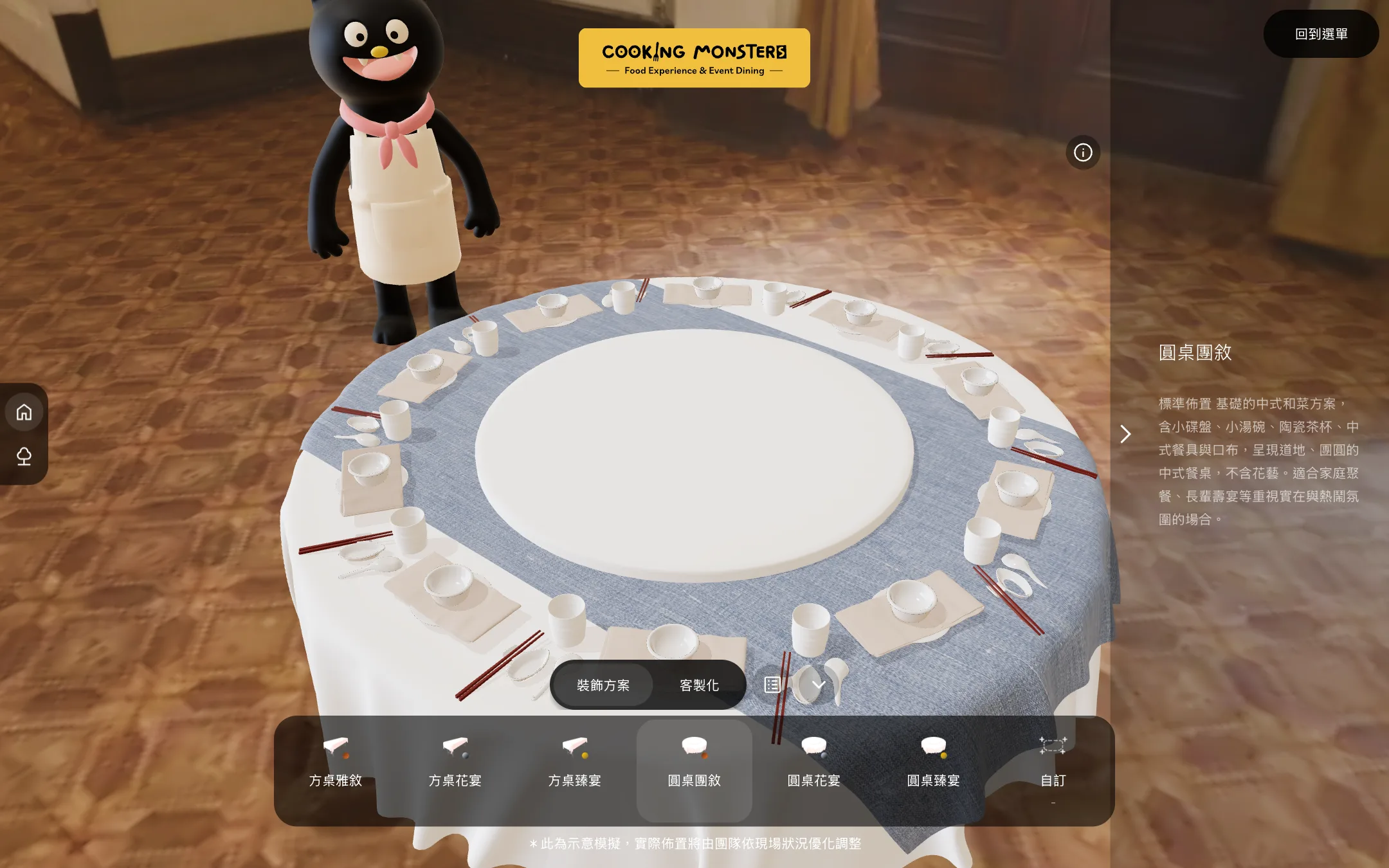
Seat placement is decided by a hidden anchor model. Each table type has one, and every child node inside it records the position and rotation of one seat. The scene reads these coordinates and places copies of the chair, placemat, plate, cutlery, glassware, napkin, and menu card at each seat. Changing the table type swaps in a different anchor model, and the seat count and positions rearrange to match. Camera positions also come from named nodes in the model file: each table type has two camera positions, a wide view and a close view. Switching moves the camera with an easing curve that lasts 1.2 seconds by default, and the duration and the curve can be adjusted in the environment settings of the admin console.
Items and options carry a visibility condition field. A value of -1 means always show; any other value points to a specific item and makes the entry appear only when that item is selected. Placemats appear only on square tables, table runners use a different model for each table type, and the options for a glass set are filtered by glass type. When the table type changes, the system recalculates the visible items in each category and remembers the previous choices for each table type, restoring the earlier choices when the type is switched back.
Napkins and table runners apply textures to a shared model, so the same model can take many patterns; the transparent material of the floral arrangements is set to double-sided with depth writing turned off.
A preset is a mapping from category to item, stored in the admin console, and only active presets appear on the page. The first preset is applied automatically once loading finishes; selecting any other preset writes the choices for the whole table at once and triggers a rearrangement. The six presets are three each for square and round tables, while customization lets each of the ten categories be swapped item by item. Each preset card shows its total, and during customization the page adds up the surcharges of the selected items and options as the selection changes. The page states that the view is an illustration, and the actual setup is adjusted by the team to suit the venue.
Research is available on letting customers configure the whole table themselves. Franke et al., 2010 studied mass-customized products and found that products designed by the customer attract a higher willingness to pay, with the effect arising through a sense of accomplishment. The study covered product configuration tools and left catered events out of its scope, so it serves here as a direction only.
The phone version steps down for performance. The shadow map resolution drops from 2048 to 512 with basic shadows, contact shadows and antialiasing are turned off, and the pixel ratio cap drops from 2 to 1.5. The camera pulls back according to the table type, to 2 times the desktop distance for the overview and 1.5 times for the seat view, so that a narrow screen can still show the whole table top.
Rotation performance gets separate handling. Drinking glasses use a transmissive material that switches to 20% opacity with transmission turned off while the view is dragged, which saves an extra render pass, and the material fades back after the drag ends. The matching shader variant is precompiled once after loading, so no compile happens during the first rotation. Shadows are recalculated for 45 frames after the content changes and then frozen, and no per-frame recalculation happens during rotation. Once the configuration data arrives, all models and textures are preloaded, so switching an option needs no download wait.
Model geometry is compressed with Draco (see the Khronos glTF Draco extension specification), and the decoder is self-hosted with the site and depends on no external service. The scene has an outdoor and an indoor environment that fade in and out when switched, and the table setup stays in place.
When the setup is finished, the selection is saved back to the same order as item and option codes together with the chosen package, so the caterer's team can see in the admin console which package and items the customer picked. The same flow of seeing the finished product before deciding is used for custom signage, covered in previewing custom signage before payment.
Pages That Search and AI Engines Can Read
On the home page of the questionnaire site, the service cards get data on the server and are pre-rendered, revalidated once an hour, so a crawler reads the service names and descriptions on its first load. Google's documentation on JavaScript SEO basics states that Google processes a page in three phases, crawling, rendering, and indexing, that only content visible after rendering can be indexed, and recommends server-side rendering or pre-rendering.
The page embeds three sets of structured data: web application, organization, and FAQ. The visible FAQ text and the structured data come from the same admin data, so the wording matches on both sides, which meets Google's requirements for structured data: marked-up content must be content that readers can see. An individual proposal page is the customer's private content, so it is left out of the sitemap and excluded by the robots rules.
When This Approach Does Not Fit
- Services whose quotes require a site visit and negotiation each time and have no fixed spec to write into the admin console: a program cannot decide the amount, and the form can only collect requirements
- Services with few items, where the finished product is easy to picture from text: a 3D table is unnecessary, and the form with spec-based quotes is enough
- Services where the chef decides the dishes day by day and there is no fixed dish library: candidate dishes cannot be pre-filtered
What to Prepare
Three sets of material are needed first: the spec for each service, including the pricing method, the price per person, the optional add-ons, and the dish-count range for each category; the current dish list, with markings for meat or vegetarian, spiciness, and suitable season and venue, together with the menus that customers accepted in the past; and the dates, head counts, venues, and dietary restriction conditions that customers ask about most often. A 3D table also needs a model for each table type and an item list for categories such as tables and chairs, tableware, and floral arrangements. Once the material is ready, confirm the scope with the development team, and then assess which services are suitable to launch first.