


A video generation model handles one shot at a time. Whether the dog in shot three is the same individual as the dog in shot thirty, or whether the pillar on the street sits on the left or the right of the frame, the model does not remember on its own. Those conditions have to be settled before generation as reference assets and written rules, and then attached to each shot. This article describes that pre-production work, drawn from an awareness film made for the Taiwan SPCA. The overall workflow is covered in the project approach for the animal welfare awareness film, and the scope of production and services is described under AI video production.
Consistency across shots has to be handled before generation
Keeping one subject stable across images is a recognized hard problem in research. Tewel et al., 2024 point out that when a text-to-image model receives different prompts, holding the same subject across those prompts is difficult, and the paper proposes a training-free method. Zhou et al., 2024 address subject consistency for long sequences of images and video with StoryDiffusion.
These methods operate inside the model, where neither the client nor the production team can change anything. What the production team controls is the input side: one character sheet, one spatial reference image and one block of style text, with every shot using the same version of each. The Seedance 1.0 technical report (Gao et al., 2025) is one of the public documents for this kind of video model. In practice, such models accept reference images and reference videos in addition to text, so the production team decides what to attach to each shot and what each attachment is responsible for.
Character sheets: four views, costume states and rule-by-rule checks
Each character gets a character sheet first. Four views of the same character sit on one image, so every later shot has angles other than the front to compare against.
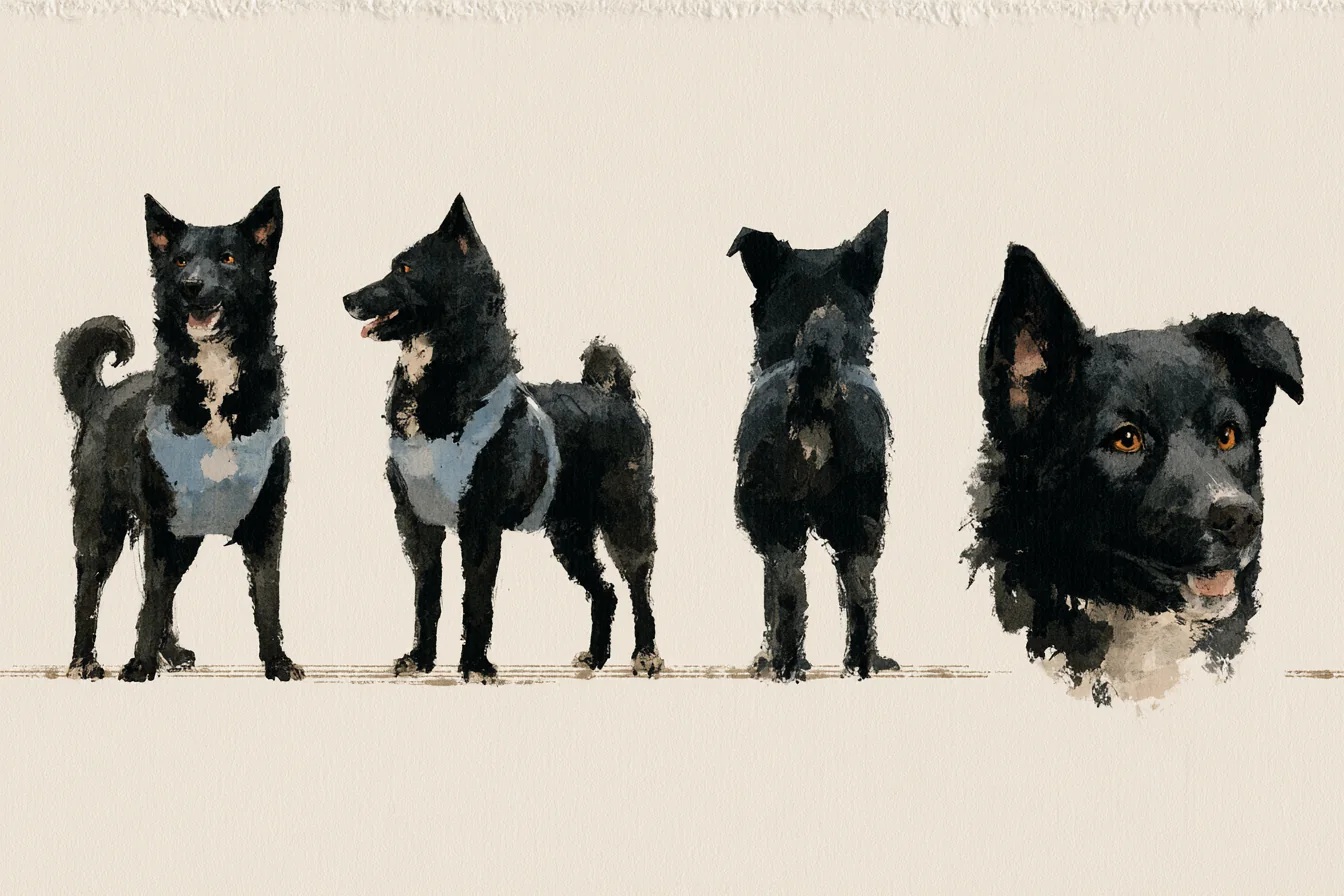
A character with more than one costume state gets a separate sheet for each state. During captivity the dog wears a collar. After the rescue the dog wears a light blue harness and a fabric leash. Each state has its own sheet, and no sheet is produced by editing another one. The costume change carries part of the story, so the model is never left to decide it. The same split works for event characters that need several outfits, as described in character systems for large campaigns.
The character rules are written as individual sentences, and each one can be answered with a match or a mismatch when held against a frame.
- Placement: the collar or harness matches the character sheet
- Clear neck: in the harness state, nothing extra sits around the neck
- Leash material: a fabric leash, not a metal chain
- Eyes: solid amber, with no white showing
Descriptions such as "looks gentle" cannot be checked, so such descriptions stay out of the rules. A rule keeps only what a viewer can see on screen, which makes a shot-by-shot review possible to finish.

Spatial reference images for scenes: style reference and spatial reference kept apart
Scenes use two kinds of image, specified separately. The style reference is the master image of the whole street block. It sets the brushwork, the color tone and the overall look of the place. The spatial reference is a scene board for one camera position, and it sets the geometry at that spot. With the two kept apart, swapping a scene board leaves the brushwork alone, and adjusting the brushwork leaves the geometry alone.
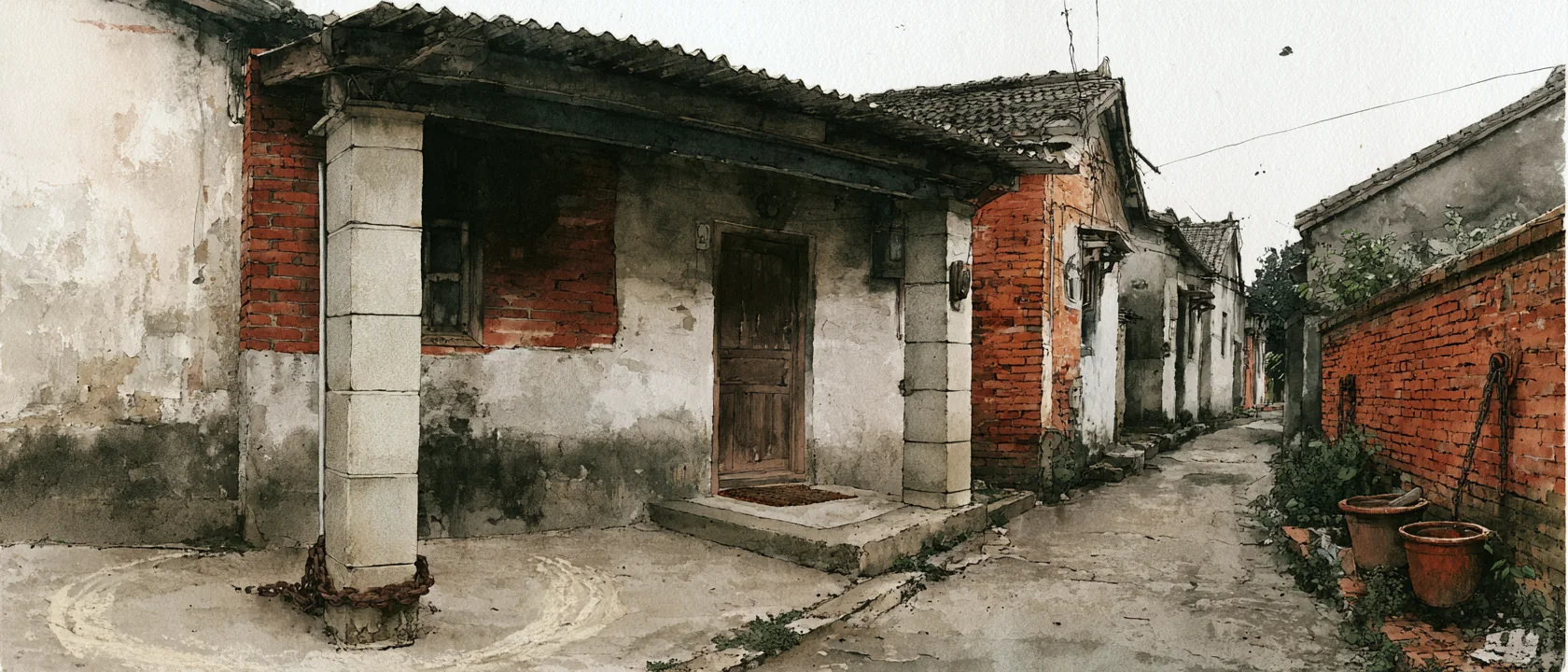
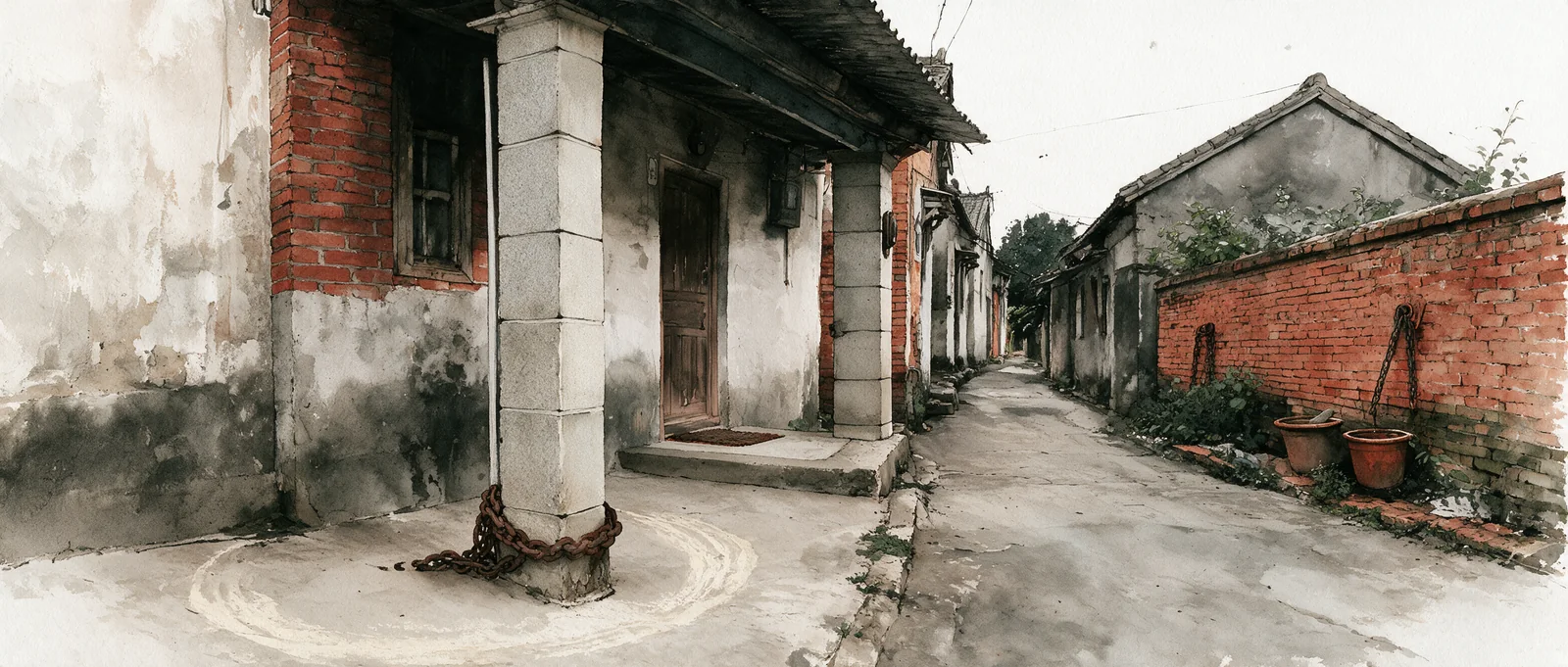
The spatial rules are written in a separate document that turns relationships visible in the image into sentences that can be checked:
- The outer edge of the arcade is a granite pillar. The chain is wrapped around the base of the outermost pillar, and the scuff marks form an arc centered on the pillar base
- The wooden door is in the inner wall, diagonally opposite the pillar
- In every arcade shot, the pillar is on the left of the frame and the door is on the right, so the screen direction stays fixed
- The red brick wall across the lane runs diagonally along the lane
Fixed screen direction pays off in editing. Objects in adjacent shots do not flip sides, so the viewer does not have to re-orient at every cut. The spatial reference image and the rules document complement each other. The image carries appearance, while the document carries the relative positions that a model tends to overlook, such as which object sits diagonally opposite another and which point the scuff arc is centered on.
How reference images are used in generation: first frame locks composition and costume, video reference locks pacing
The IP-Adapter paper by Ye et al., 2023 observes that text prompts alone make it hard to get the intended result, and that an image used as a prompt fills the gap. Video follows the same logic. Costume, composition and location are specified with images, and the text mainly describes action, camera and sound.
Reference images are uploaded first and converted into identifiers, then cited by identifier at generation time, and the shot list names the characters appearing in every shot. The first frame and the video reference divide the work as follows. The first frame is an edited image that locks composition and costume. The video reference locks the rhythm of the action. A video reference carries more weight than a text description of costume, so when costume must be locked, the edited first frame is the authority and the video reference supplies only the segment that needs to be matched. The first frame and any attached image count as the single source of truth, and everything on screen follows the image, with nothing added and nothing removed.
Pre-production assets (reused across the whole film once finalized)
- Character sheetsOne per costume state
- Spatial reference imageGeometry of one camera position
- Style reference imageOverall brushwork and color tone
- Rules documentCharacter rules and spatial rules
Inputs for a single shot
- First frameEdited image that locks composition and costume
- Video referenceOnly the segment to match, locks pacing
- Text promptAction, camera and sound
Video generation model
- Generate one shot
Stays in the rules documentThe rule-by-rule list is not sent to the model and is kept for comparison during review.
Division of inputs for a single shot. Arrow labels name what crosses each boundary.
Adjusting the shooting approach to the model's tendencies
These models are less stable in a few situations. The remedy is to adjust the shooting approach at the storyboard stage, so that every shot falls within what the model handles well and less needs fixing during generation. Depending on shot content, the practice comes down to five rules:
- Connected objects: for connections such as a chain on a pillar or a hand on a leash, use a close-up and frame the point of contact out of the shot, because in a wide shot the connection point tends to drift
- One emotion per shot: an emotional change with several stages is split across several shots and left to editing, so each shot carries only one
- Emotional scenes at medium close-up or closer: wide shots only establish geometry such as position and distance
- Error-prone actions show only the resulting state: unchaining is shown only as the result shot after the chain is off, and the overhead shot of counting to six uses a freeze-frame image as its first frame
- Empty shots state explicitly that the frame holds only the scene and no living creature, so the model does not add a character on its own
- One beat of the storyboardCharacters, scene board and emotion already set
- Check the shot contentConnected objects, action process, emotion, geometry
- Objects are connectedClose-up, connection point out of frame
- Action process is error-proneShow only the resulting state, freeze-frame as first frame
- Emotional sceneMedium close-up or closer, one emotion per shot
- Only space or geometryWide shot; empty shot states no living creature
Whole-film pass condition: each shot checked by hand against the rules
The VBench benchmark by Huang et al., 2023 lists subject consistency as a separate evaluation dimension and also notes that existing automatic metrics do not always match human perception. Automatic metrics therefore serve only as a supplement, and the pass condition remains a shot-by-shot human check against the rules document.
The storyboard stage produces two versions at once. The human-readable version is the script. The machine-readable version records the scene board and the emotion of every beat, so each generated clip can be traced back to the same data. Every generated clip in the film is checked against five items: geometry, placement, clear neck, leash material and eyes. Only when all five match does the clip move into editing. Picture, subtitles and sound are checked as separate items, and each finding goes through a second round of review to confirm it is real before anything is changed. Batch production uses a similar approach, described in quality gates for batch content.

All three full films are public on the Taiwan SPCA YouTube channel: the dangerous animal ban film, the microchipping and registration film, and the ink-wash film discussed here.
When this approach does not fit
- Footage that must match a physical object item by item, such as a product operation demo. This kind of content is better served by live-action filming or 3D rendering
- Projects whose schedule does not allow the pre-production assets to be finalized and reviewed first. The character sheets and spatial reference images must be complete before the storyboard
- Content that must match a specific real person's appearance exactly and has likeness permission. Live-action filming is the better choice
How cost and schedule change with the number of shots and pre-production assets is covered in AI project cost estimation. For a specific film, contact the development team to scope the work.