Configurations outgrew the catalog, so customers finish the build before visiting a store
An online 3D configurator for a folding bicycle. Customers complete the build before entering a store, check dimensions and rider fit, then carry the configuration to a dealer.
The same approach suits high-priced customizable products: bicycles, electric motorcycles, furniture, luxury accessories and outdoor gear.
The H6 model offers 15 swappable parts and 15 frame colors, in two grades, Pro and Ultra, and four styles. Any catalog photo shows just one combination.
Before ordering, customers most often want to confirm three things: how the bike looks after changes, how small it folds, and how well it fits the rider. These were settled in the store, and the project aimed to let customers settle all three online before visiting a store.
One tap folds the bike with an animation, and with dimensions switched on, length, width and height are marked for both the folded and the unfolded state.
(Approach)
A persistent 3D full-bike scene with a transparent configuration layer
A complete 3D bike scene stays on screen, with a transparent selection layer above it. Every option change appears on the bike immediately.
Mobile performance came first. Common compression methods leave a 3D model's geometry data taking nearly twice the display memory once decoded. The pipeline slims the data first and compresses it second: downloads are about one-fifth smaller than the original format, with no added memory use.
Desktop
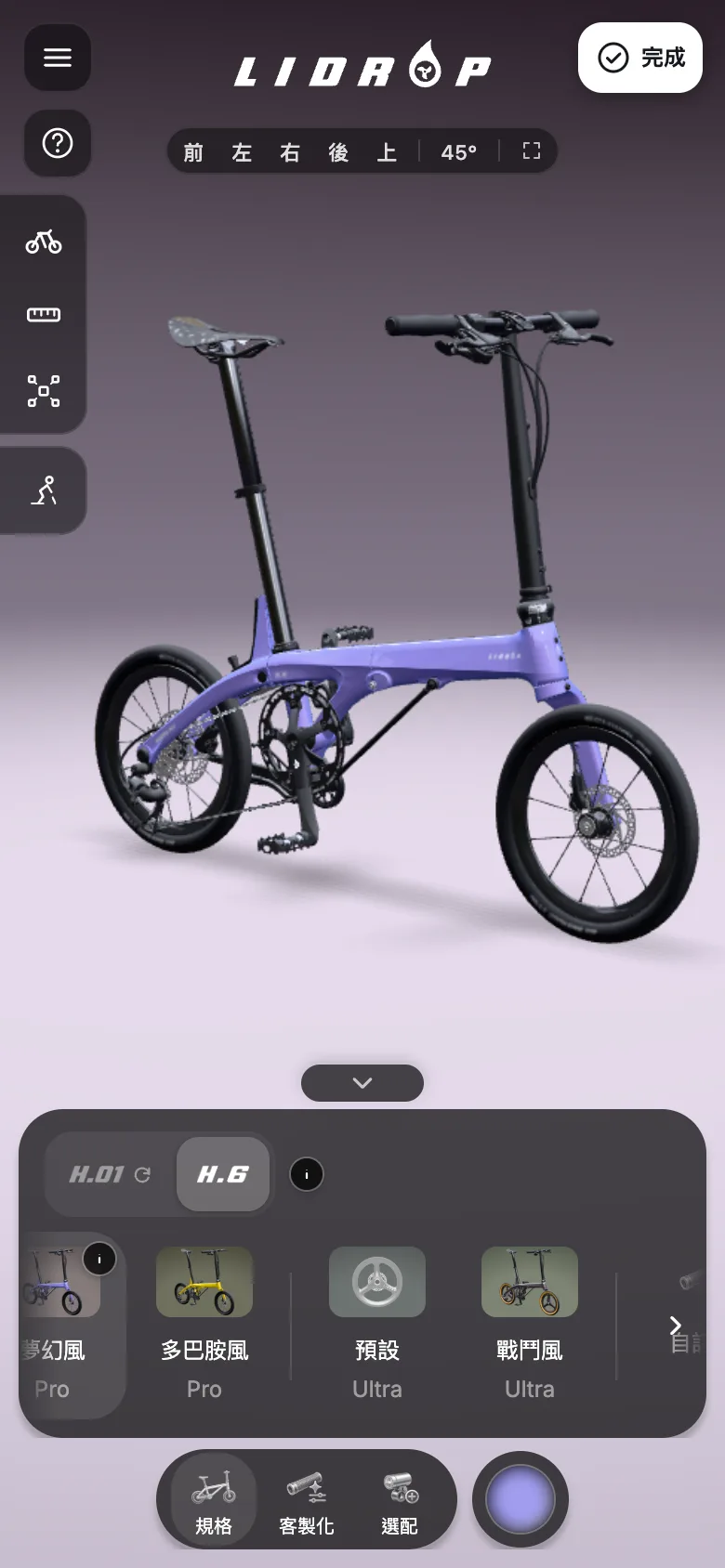
Styles switch in one tap, and the backdrop follows the style
The style bar lists the Pro and Ultra grades and several styles. Selecting one changes the frame, wheels and backdrop together, and color mode repaints the frame one color at a time.
Four styles switch in one tap, the whole bike and the studio backdrop change together, and color mode then repaints the frame in several colors.
Each layer is written up as a full article.
A 3D configurator splits into four layers, and the hard parts sit where the layers meet
Layer 1
Layer 2
Layer 3
Layer 4
Configurator
1
ConfiguratorSplitting the modelA main bike file plus one file per part, bound by part name
2
ConfiguratorBlocking invalid combinationsExplain why a combination cannot be built, then switch to one that can
3
ConfiguratorSourcing the dataSpecs come from the backend database; the front end hardcodes none
4
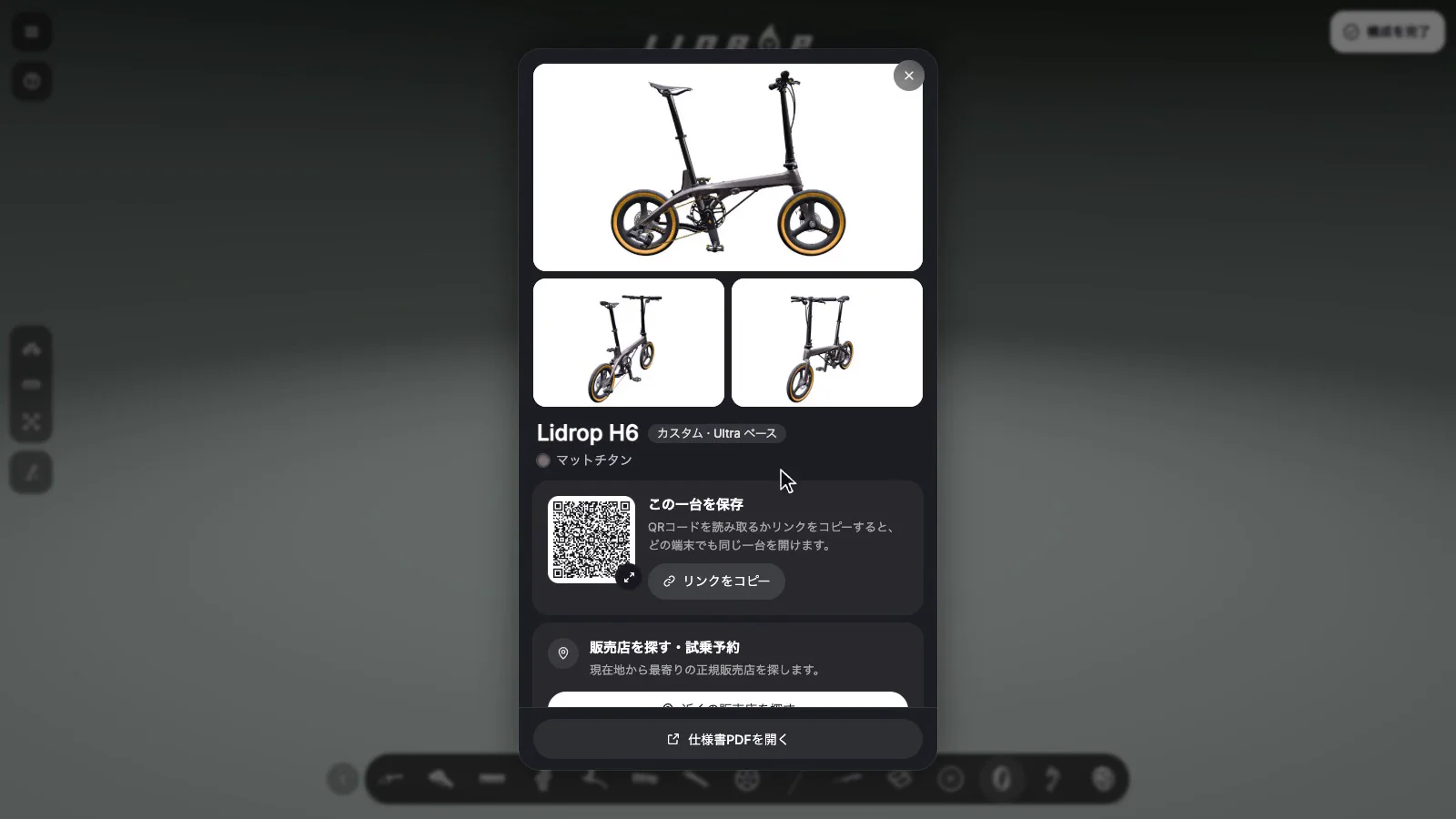
ConfiguratorHanding off the configurationConfiguration card, QR code, spec PDF
Each option shows a reference weight beside it. Combinations that cannot be installed come with an explanation and switch automatically, so the configurator never produces a bike that cannot be built.
Wheels, saddle and tires are swapped part by part in the custom tab, reference weights are shown beside the wheel and saddle options, and finishing the configuration opens a card with three views, a QR code and a dealer search.
The exploded view moves parts outward in 31 steps with each step named at the top, tapping a part label once it is fully open focuses the camera on that part, and closing the view returns every part to its place.Choosing an E-Bike brings up the reason a part cannot be fitted, and the switch happens only after confirmation.
Keeps an unbuildable bike from being configured.
A conflicting combination is blocked and explained first, then switched only after confirmation
Tap
Block
Explain
Confirm
Switch
Customer
Configurator
1
CustomerTaps a conflicting part
2
ConfiguratorRules table blocksThe combination cannot be built
3
ConfiguratorScreen explains why
4
CustomerConfirms
5
ConfiguratorAuto-switchE.g. E-Bike fits only on Pro
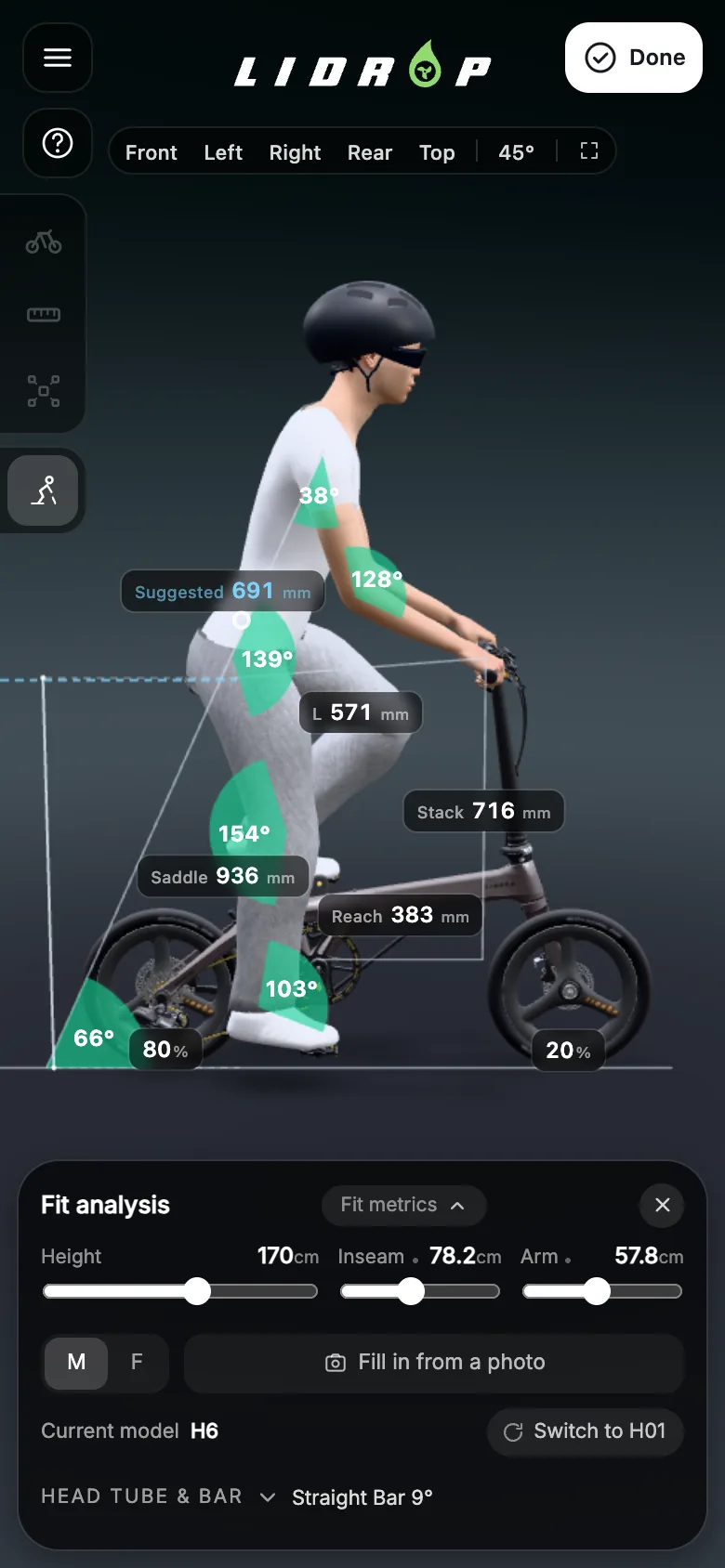
A 3D rider driven by height, leg length and arm length shows knee and hip angles and the weight split between front and rear wheels. Photos are processed on the device only, never uploaded or stored.
Desktop
Fit analysis, updating as the slider moves
Fit analysis shows a 3D rider with knee and hip angles, seat height and front and rear wheel weight distribution. Dragging the height slider reshapes the rider and updates every figure at once.
Fit analysis shows a 3D rider, dragging the height slider reshapes the rider instantly, and joint angles, seat height and front and rear wheel weight distribution update together.
Take home
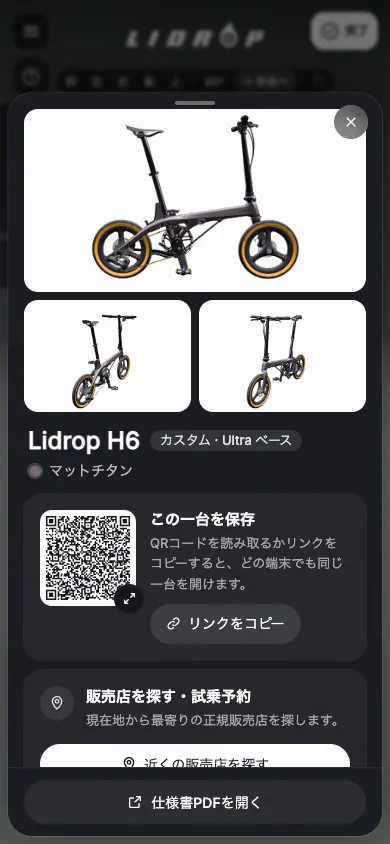
The finished build becomes a personal configuration card: three-view renders, per-part specifications and weights, a QR code and a spec PDF. The card also searches by location for nearby authorized dealers.
Desktop configuration card with three views, a QR code and the specs.The same card on a phone.
From the card, search for authorized dealers near a location.
For high-value products with complex options, bring the models and a spec sheet to the first meeting.
Fully working in a phone browser, with no app to download.
Phone
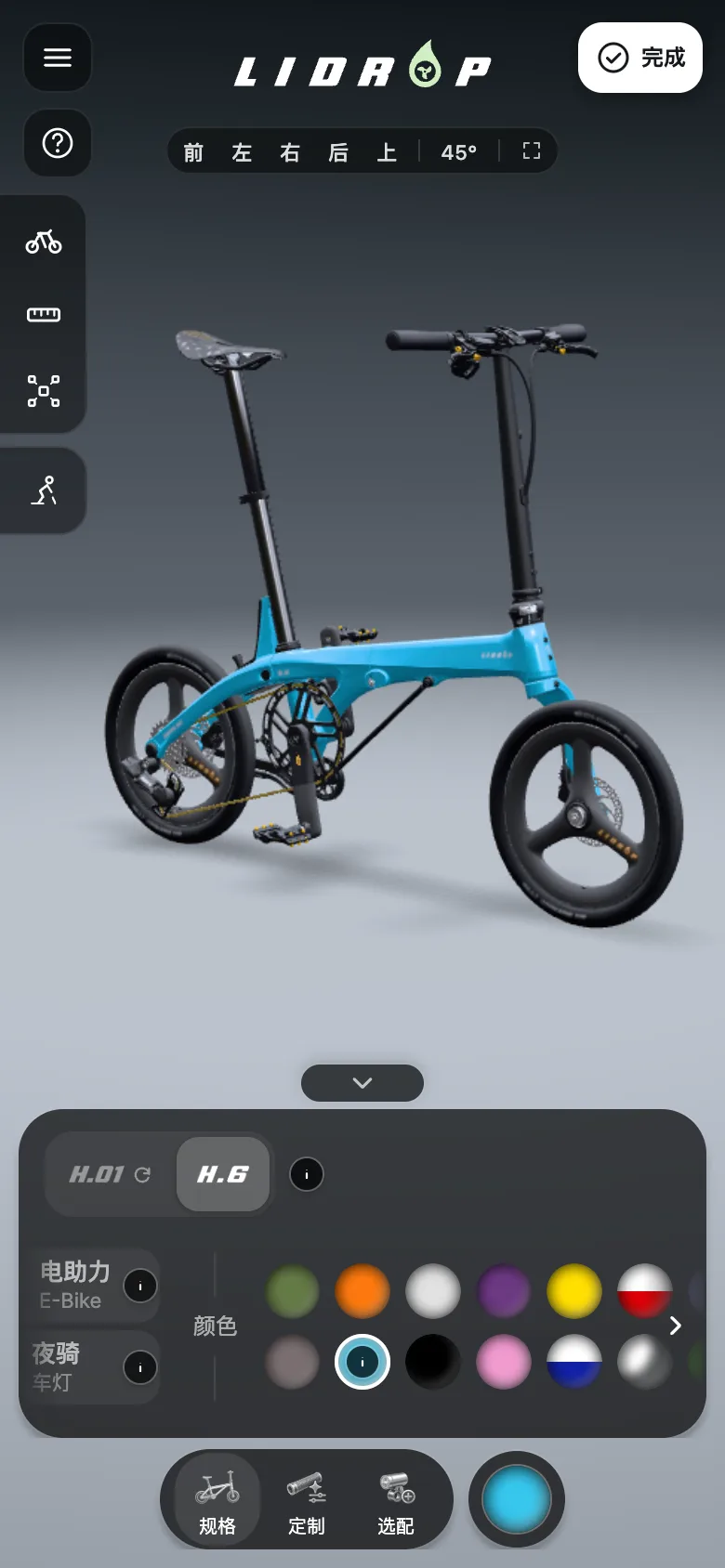
Fully operable on a phone, with nothing to download
The same configurator runs completely in a phone browser, with no app to download. The style bar scrolls sideways, and color mode repaints the frame one color at a time.
Four styles switch in one tap, the whole bike and the studio backdrop change together, and color mode then repaints the frame in several colors.
Phone
The same live fit analysis on a phone
Fit analysis appears on a phone as the same 3D rider. Dragging the height slider updates the joint angles and the front and rear wheel weight distribution.
Fit analysis shows a 3D rider, dragging the height slider reshapes the rider instantly, and joint angles, seat height and front and rear wheel weight distribution update together.
Wheels, saddle and tires are swapped part by part in the custom tab, reference weights are shown beside the wheel and saddle options, and finishing the configuration opens a card with three views, a QR code and a dealer search.One tap folds the bike with an animation, and with dimensions switched on, length, width and height are marked for both the folded and the unfolded state.The exploded view moves parts outward in 31 steps with each step named at the top, tapping a part label once it is fully open focuses the camera on that part, and closing the view returns every part to its place.
(Result)
Two production sites and six languages from one codebase
The international and China sites are built from one codebase, with interfaces in Traditional Chinese, Simplified Chinese, English, German, Japanese and Korean. The China site gets separate handling: self-hosted fonts, adjusted tracking, images served on-site and a CDN for 3D models.
International site in Traditional Chinese, after switching style.China site in Simplified Chinese, after changing the frame color.International site in English, showing the fit analysis.
Six languages and two live sites share one set of spec data.
The front end hardcodes no specs; one codebase produces the international and China sites from the data
Data source
Backend databaseSource of truth; six-language columns
Static fallbackA separate copy
Specs
Front end
One codebaseInterface in six languages
Built from the data
Sites and customer documents
International site
China site
Configuration card
Spec PDF
Missing valuesThe configuration card shows a dash for missing speeds or teeth.
Dropping derivable prefixes shrinks the URL from over 1,000 characters to about 120Dropping derivable prefixes shrinks the URL from over 1,000 characters to about 120
JSON plus base64over 1,000 charactersToo dense for a phone to scan
Two rounds of inventory cut the first-screen download from about 57 MB to about 37 MB, each round touching only data never used at runtimeTwo rounds of inventory cut the first-screen download from about 57 MB to about 37 MB, each round touching only data never used at runtime
Before the inventoryabout 57 MBFirst-screen download
Round oneabout 14 MBThree adjustments, all to data never used at runtime
After round oneabout 43 MBFirst-screen download
Round twoabout 6 MBThree adjustments on the asset side
After round twoabout 37 MBFirst-screen download
Same model throughout; after each build, a headless browser reads the resource requests and classifies requests by file extension
Scaling down the body-color textures removed about 150 MB of GPU usage, and verification afterward changes nothing further Related methodScaling down the body-color textures removed about 150 MB of GPU usage, and verification afterward changes nothing further
Original texturesAbout 160 MB14 textures at 4096, 12 of those solid color
Pixels dropped by the scale-downAbout 150 MBNo loss in the image
Scale down to 1024About 10 MBTwo-color textures scaled back up differ from the original by 0
Decode back and compare in fullAbout 10 MBAll 14 checked one by one, no sampling
One batch of 14 body-color textures. Figures are approximate.
Read the full articleA solid-color texture of about 1 KB wastes about 43 MB of GPU memory across 8 GLB filesA solid-color texture of about 1 KB wastes about 43 MB of GPU memory across 8 GLB files
File sizeGPU footprint
About 1 KB
Solid-color texture, originally 2048²Wasted GPU memory
About 43 MB
File size unchanged
The same texture shrunk to 4×4Image unchanged
Near zero
The same 2048² solid-color texture placed in 8 GLB files; GPU usage is the total for all 8. Shrinking to 4×4 is an in-place rewrite, so the file size of each GLB stays the same.
Read the full articleDecide by the standard deviation after decoding: shrink to 4×4, or compress into KTX2Decide by the standard deviation after decoding: shrink to 4×4, or compress into KTX2
Decode at full resolutionRead RGBA32, every channel including alpha
Compute the standard deviation
Standard deviation is 0
Shrink to 4×4Solid color, image unchanged
Standard deviation is high, with transparency
High quality UASTCKeeps cutout edges intact
Standard deviation is high, no transparency
Low bit rate ETC1SDecode and compare; re-encode any gray one with UASTC
Rewriting a whole GLB through a library grew the file to about 1.4 to 2.9 times its original size Related methodRewriting a whole GLB through a library grew the file to about 1.4 to 2.9 times its original size
Original sizeSize after whole-file rewrite
about 5.0 MB
Model oneWhole-file rewrite
about 9.1 MB
about 4.8 MB
Model twoWhole-file rewrite
about 14.1 MB
about 6.6 MB
Model threeWhole-file rewrite
about 9.3 MB
File sizes of three GLB files before and after a whole-file read and write through a graphics library, rounded to approximate values
Read the full articleElimination sorts a visual defect onto either the asset side or the pipeline side Related methodElimination sorts a visual defect onto either the asset side or the pipeline side
View the compressed and the full versionIf both show the defect, compression encoding is not the cause
Show textures alone, then switch textures offRules out the textures
Switch to back-face displayIf the far side is visible, the surface is missing there: a hole in the geometry
Open the source file directly in BlenderRules out the development team's own processing
Compare the same-named part across two colors of one modelShows whether the defect appears in only one color
The defect appears when the source file is read directly
Judge it an asset problemReturn it to the modeler with the position and the count
The source file is clean and only the production file is wrong
Judge it a pipeline problemThe development team regenerates from source and compares again
Colors after compression differ from the source
Check compression first, not the assetDecode back and compare with the source, texture by texture
Read the full articleDefects in the asset belong to the modeler; reproducing and accepting the production file belong to the development teamDefects in the asset belong to the modeler; reproducing and accepting the production file belong to the development team
Intake
Reproduce and repair
Acceptance
Modeler
Development team
Client
1
ModelerSupply source files and export settingsSource files are what make the production file reproducible
2
ModelerResupply or re-exportFor the missing faces, duplicates, and extra nodes on the return list
3
Development teamCompare item by itemMissing faces, duplicates, extra nodes; asset or pipeline when the picture is wrong
4
Development teamReproduce the production fileRecord source, output, and parameters; no second quantization of skinned parts
5
Development teamAccept with numbers attachedWorld-coordinate offset, visible mesh count, bone displacement
6
ClientProvide the existing model or CADWith the list of parts to change
7
ClientDecide whether to rebuildWhen the modeler does not provide source files
8
ClientConfirm against the acceptance tableEvery line has visible evidence
Intake results and interaction depth split one request into different quote routesIntake results and interaction depth split one request into different quote routes
Confirm the model sourceIs there a source file that can reproduce the live version
Eliminate causes at intakeTell broken assets from broken processing
Confirm interaction depthInspect, configure, step through disassembly
Complete source, no missing faces, interaction limited to inspect and configure
Main items: lightweight optimization, going live, device tuningThe simplest route
Complete source, plus a client-supplied CAD exploded sequence
Add sequence mapping and list what will not carry over before work startsHow far it goes is calculated
Intake finds missing faces, duplicates, or stray nodes
Repair gets its own line; other items stay conditionalSettle first whether the asset is at fault
Source cannot be explained, or damage is too large to repair
Rebuild is priced separately; other items wait for the final modelA rebuild is separate modeling work
Read the full articleScope, ceilings, and lists are all settled in the specification phaseScope, ceilings, and lists are all settled in the specification phase
Specification
Production
Acceptance
Client
Development team
1
ClientSet the phone ceiling, confirm the scope statementMemory ceiling and texture tiers are the owner's call
2
Development teamEliminate causes at intake, list what will not carry overAnd convert the phone budget item by item
3
ClientRaise new requests separatelyAnything out of scope is priced separately, not folded in
4
Development teamLive files reproducible from sourcePhone or desktop-only decided by measurement
5
ClientCheck item by item against the scope statementWhat is listed is the complete scope
6
Development teamExplain differences against the advance listWhat will not carry over does not first appear at acceptance