Cooking Monsters: AI Menu Proposals × 3D Table Styling, So Catering Clients See It Before They Book
A catering inquiry is usually a long back-and-forth: date, headcount, venue and dietary restrictions all need to be clarified first, the menu and quote are then pieced together from the team's experience, and the table setting is left to the imagination with a few reference photos. What a client really wants the moment they ask is a concrete proposal.
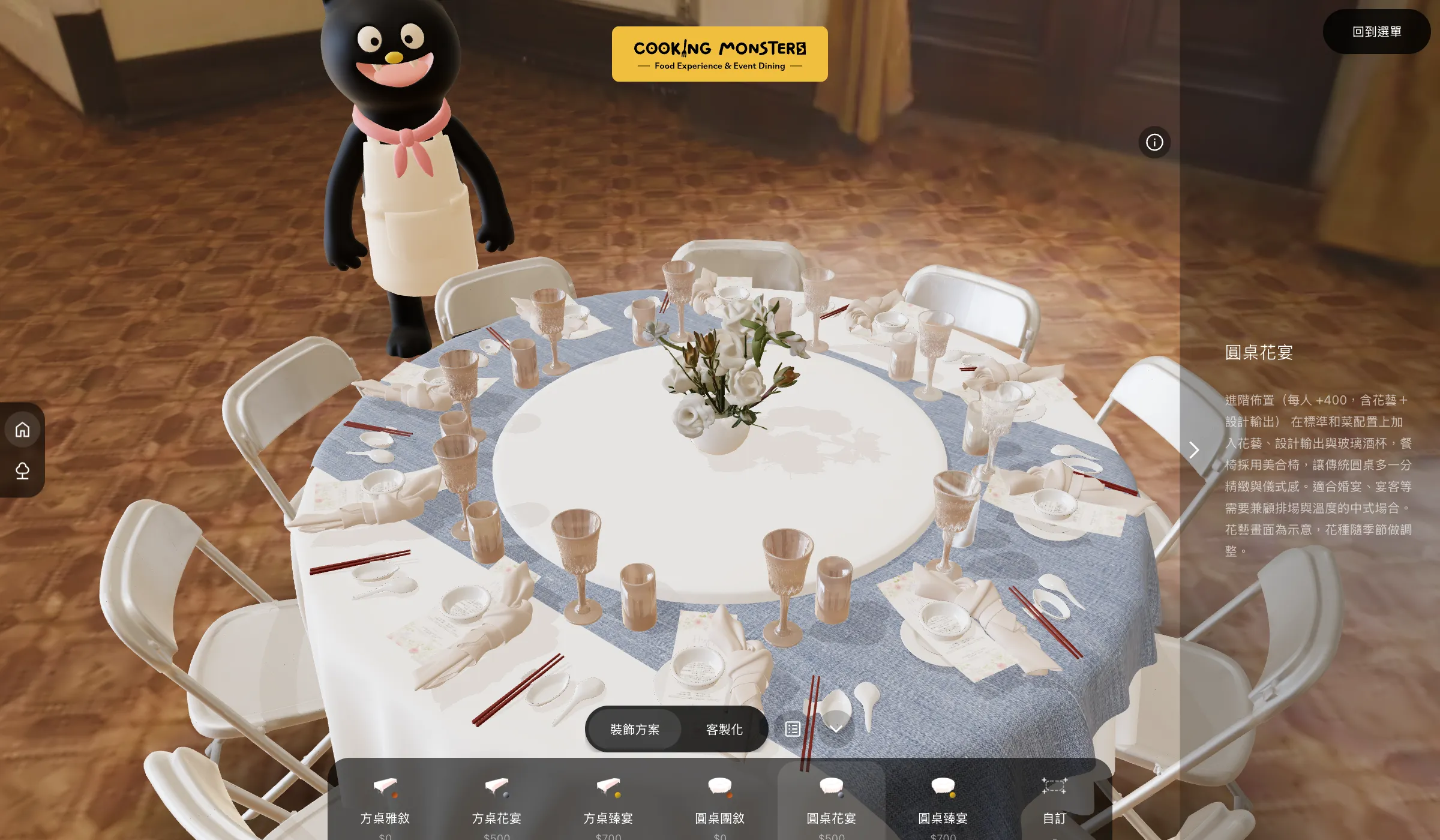
POLISH™ built two connected online tools for Cooking Monsters: an AI menu generator that turns a few answers into tiered menu proposals, and a 3D table-styling tool where clients pick tables, chairs, plates and cutlery in the browser and see the banquet before they book.
- A four-step inquiry that lets AI generate tiered menus from the caterer's own data
- Seats laid out automatically by table shape; six preset styles applied in one click
- A two-layer SEO setup that lets search and AI engines understand an interactive site
1. From Back-and-Forth Inquiries to a Four-Step Online Questionnaire
The inquiry is split into four steps: pick one of seven catering services, choose a meal slot and date (available dates come live from the system), select a headcount range and venue, and finally describe the atmosphere you have in mind and any food restrictions. The first three steps rely mostly on cards and buttons to keep typing to a minimum; progress survives a page refresh, and no sign-up or login is needed before submitting.
2. Letting the AI Find Answers in Cooking Monsters' Own Data
We did not let the AI improvise dishes out of thin air. The system first infers the season from the event date, indoor or outdoor from the venue, and whether vegetarian options are needed from the client's description, then pre-filters candidate dishes from the recipe database. Each dish's cost is calculated live from current ingredient prices. It also retrieves past events with a similar service type, budget and headcount as references for the AI's dish combinations and tone.
Pricing is never left to the AI: proposal names, per-person prices and add-on services are always taken from the service specs in the admin, and the backend overwrites them even if the model gets them wrong. Proposals step up from classic to upgraded to chef's signature, following the specs, and must avoid any restrictions the client mentioned. Prompt sections such as chef persona, naming rules and description formula, along with model parameters, are managed separately in the admin, with every edit versioned and reversible.
3. 3D Table Styling: The Table Sets the Seats, Presets Apply in One Click
The 3D styling is driven by the table. Each table shape carries a hidden positioning model whose nodes mark every seat's position and orientation, and chairs, plates, cutlery, glassware, napkins, menu cards and other items are placed on those nodes. Switching table shapes therefore needs no manual adjustment: change from a rectangular table to a round one and every place setting rearranges itself. After confirming a wedding or round-table banquet proposal on the menu platform, clients are sent straight here with their order code to continue styling.
The bottom panel offers six preset styles across rectangular and round tables, each applying a full table of items in one click. Switching to "Customize" lets clients swap items one by one across ten categories, from tables, chairs and plates to florals and menu cards, while the camera moves to a seat-level view for easy comparison. Changing napkin or runner colors only swaps textures without reloading models, and all items and presets are managed in the admin, so adding a new plate requires no code changes.
4. Keeping 3D Smooth, and Readable to Search and AI Engines
All 3D models use Draco-compressed geometry with WebP textures, and the decoder is self-hosted rather than loaded from an external CDN. Every item is preloaded on entry so switching is instant. Shadows are recalculated only when the table contents change and are frozen while the view rotates; glassware temporarily turns off transmission rendering during drags and restores it on release. Photos uploaded in the admin are automatically resized and converted to AVIF in the browser.
The menu platform is a full-screen interactive app, which to crawlers looks like little more than JavaScript. We used a two-layer approach, "people see the interface, crawlers read the text": the platform introduction, services, how-it-works steps and FAQ are rendered server-side into the initial HTML, along with WebApplication, Organization and FAQPage structured data. The FAQ is maintained in the admin, and the on-page text and structured data share a single source.