(Case study) Public sector · Education・Polish 3D / Polish AI / Polish+
Teachers look up venues and plan teaching itineraries on a single platform
Teachers across Taiwan planning outdoor field trips need to search for venue information and cross-check it. The platform brings outdoor education venues across Taiwan together, so teachers can explore venues on a map, judge distances and plan a teaching itinerary.
Venue information sits in several systems, and trip planning needs one place to search
Teachers planning outdoor trips have to find time beyond a busy workload to search for venue information, compare options repeatedly and learn from other teachers' experiences and reputations before knowing whether a venue is suitable.
The platform's original focus was building and managing data. Each county and city has its own outdoor education data, and a teacher planning one trip switches between several systems to look things up, so the search and usage flow was the part to be integrated this time.
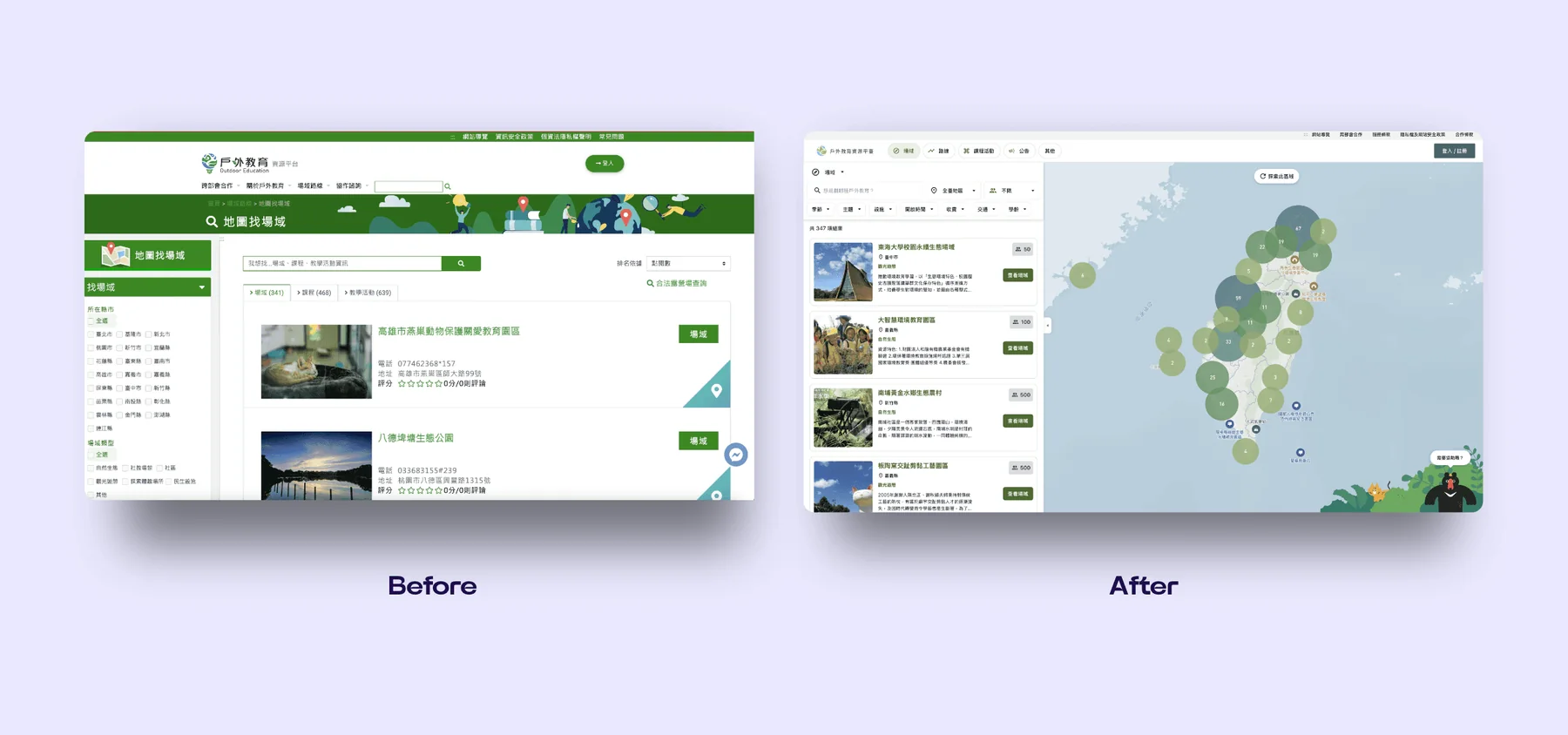
The platform's entry page before and after the redesign.
(Approach)
Learning from commercial platforms and turning the map into a discovery tool
Interviews with teachers showed that outdoor teaching resources are no longer limited to traditional recreation sites. Historical museums, ecological sites and small neighborhood shops can all become suitable resources when the itinerary has educational value.
The team studied commercial trip-planning sites and interviewed front-line educators. The needs that emerged: teachers need to know what a place suits teaching and how close it is to school; too many details, such as highway transit options, make the information complicated; and searching and choosing venues should be as simple as booking a hotel online.
The focus therefore went to a highly customized interactive map that is easy to browse and easy to search.
Desktop recording: zoom into one county, select a venue, and read what it suits and how far it is in the left column.
(Key design)
Three key designs
Interactive map
Users can find and save nearby teaching venues as easily as with a map service, upload and share personal outdoor teaching plans, and discuss classroom situations and how to respond. Venue providers such as museums and farms can list activities for reference.
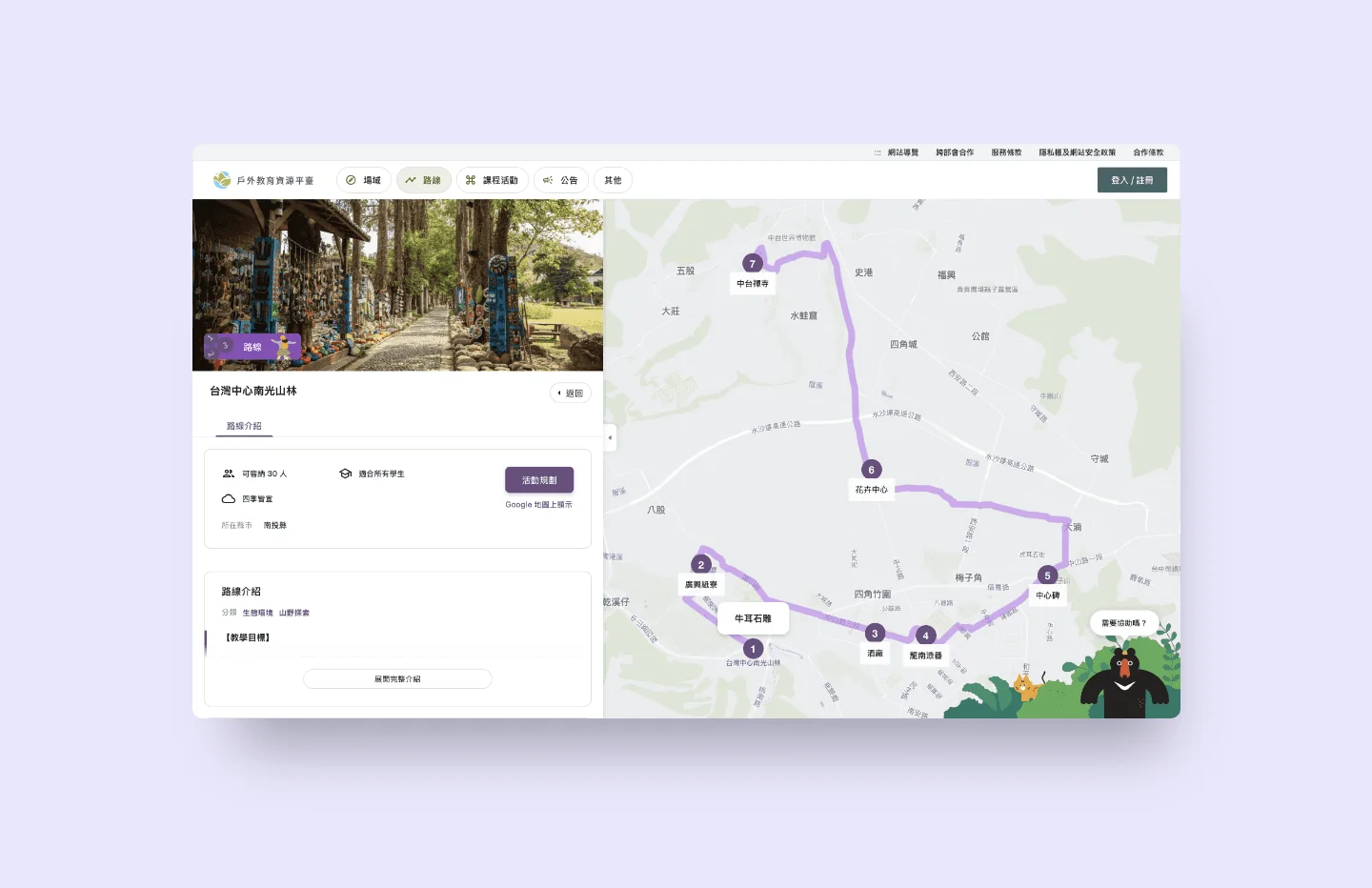
Route experience: the itinerary is drawn on the map, with venue information on the left.
Desktop
The list and map side by side, with filters updating at once
The venue list sits beside the interactive map and can be filtered by theme, season, facilities, opening hours, fees, transport and school level, and the venues in the list and on the map update accordingly. Zooming in turns numbered clusters into single venues step by step, and the animal mascot at the lower right offers a way to get live help.
Desktop screen recording: scrolling the venue list, filtering by theme and season, and zooming the interactive map.
Dedicated characters
A series of dedicated animal characters serves as the platform's identity. The characters suit families and draw on successful outdoor-education practice in Europe, the United States and Japan, serving both tourism promotion and venue displays. The forest species that represent land-based education and the marine creatures that symbolize ocean education each have a distinct brushwork, style and body design.
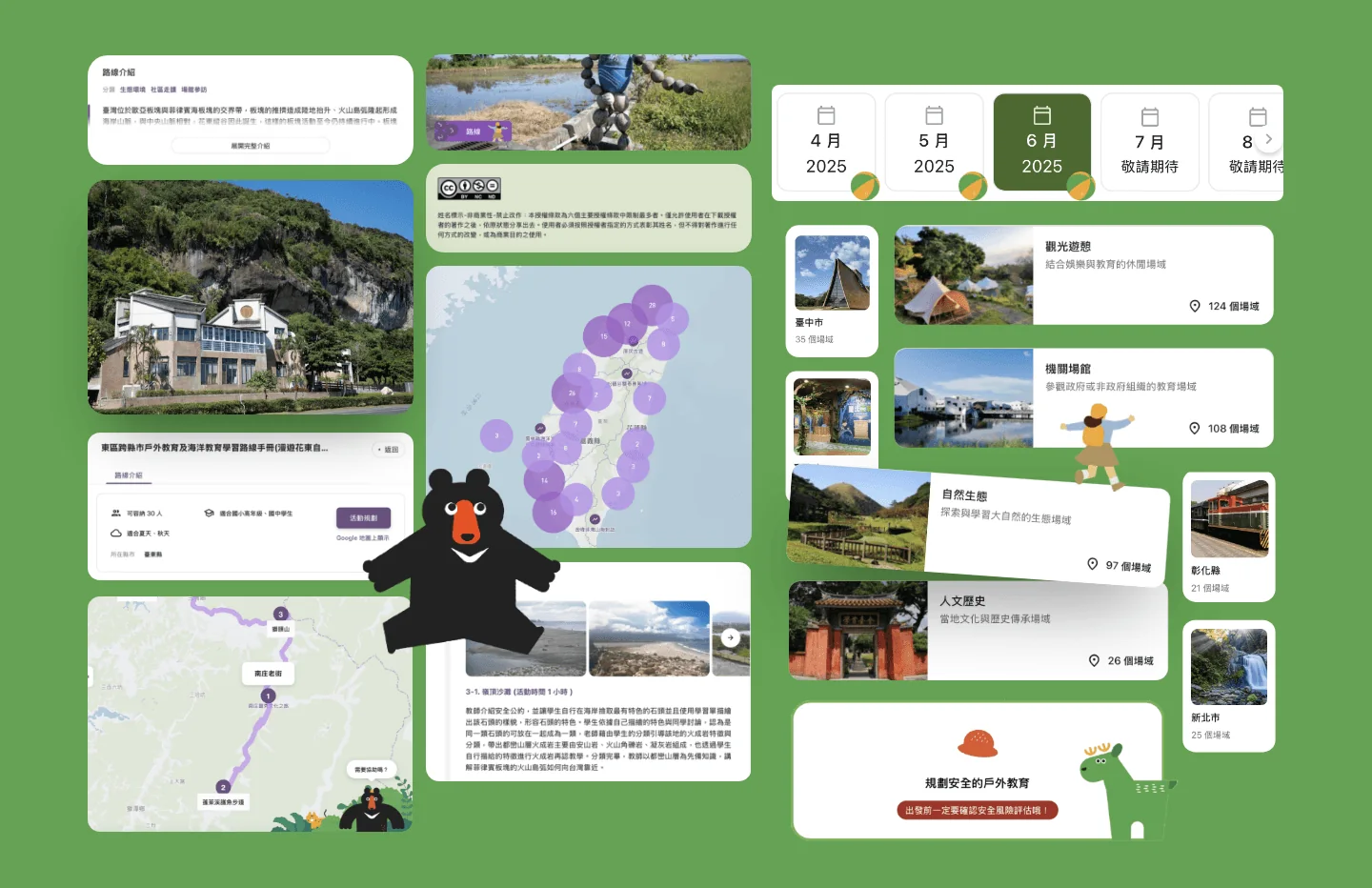
Design elements: venue cards, a month switcher and the characters.
Modular building blocks
The system is split into reusable modules: multi-role login with a permission system, an interactive map template that updates in real time, an automated data editor that takes hundreds of records in one upload and checks the format, and a workflow that combines official-document procedures with agile development. When needs change, modules are adjusted and deployed in priority order, saving communication time and development cost.
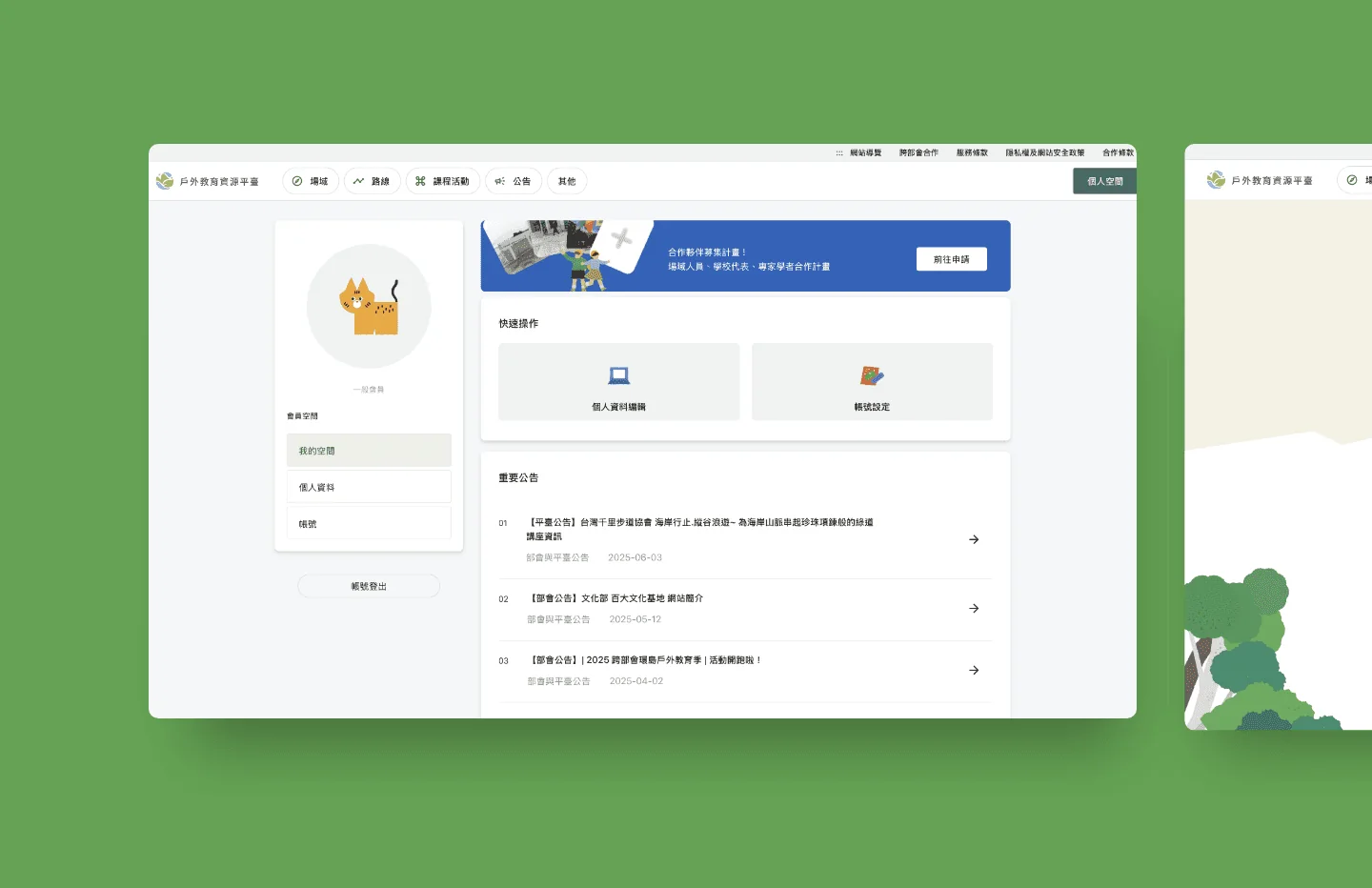
The member system's personal page.
(Delivery)
Acceptance follows the requirements document, and operations records are kept
Following the supervising agency's requirements: scans, fixes for medium and high risks, appeals for false positives, and a handover from the design tender to the engineering tender.
Document names and counts are matched word for word before quoting and dividing the work.
Acceptance rests on the requirements, so the division of work starts with transcribing the document names word for word
Requirements and quote
Performance and maintenance
Acceptance
Agency
Development team
1
AgencyRequirements list the documentsName, quantity, and format
2
Development teamTranscribe into a checklistCompare with the client’s plan; items in none of the three columns move out of scope
3
AgencySupervise and audit periodicallyEnforcement Rules, Article 7
4
Development teamScripts write the maintenance filesIntegrity, logs, monthly report
5
AgencyPreliminary and final acceptanceAcceptance records kept
6
Development teamSubmit under the exact names and quantitiesDocument obligations listed separately
Compiled from the Government Procurement Act, its Enforcement Rules, and the outsourcing provisions of Taiwan’s cybersecurity rules
At the start, only 5 venues had joined the platform. As the platform matured and teachers kept offering design feedback, participation and data uploads rose clearly, reaching 60+ new venues in a single week recently.
The project involved several departments and a more complex chain of decisions, so a new way of working was introduced together with the competent authority. Messages moved to a trackable, categorized collaboration platform, documents moved entirely to online collaborative versions, and task cards made the progress of every change, build and adjustment visible at a glance.
Communication became more efficient, the collaboration culture improved, and the relationship shifted from outsourced vendor to partner team on the platform.
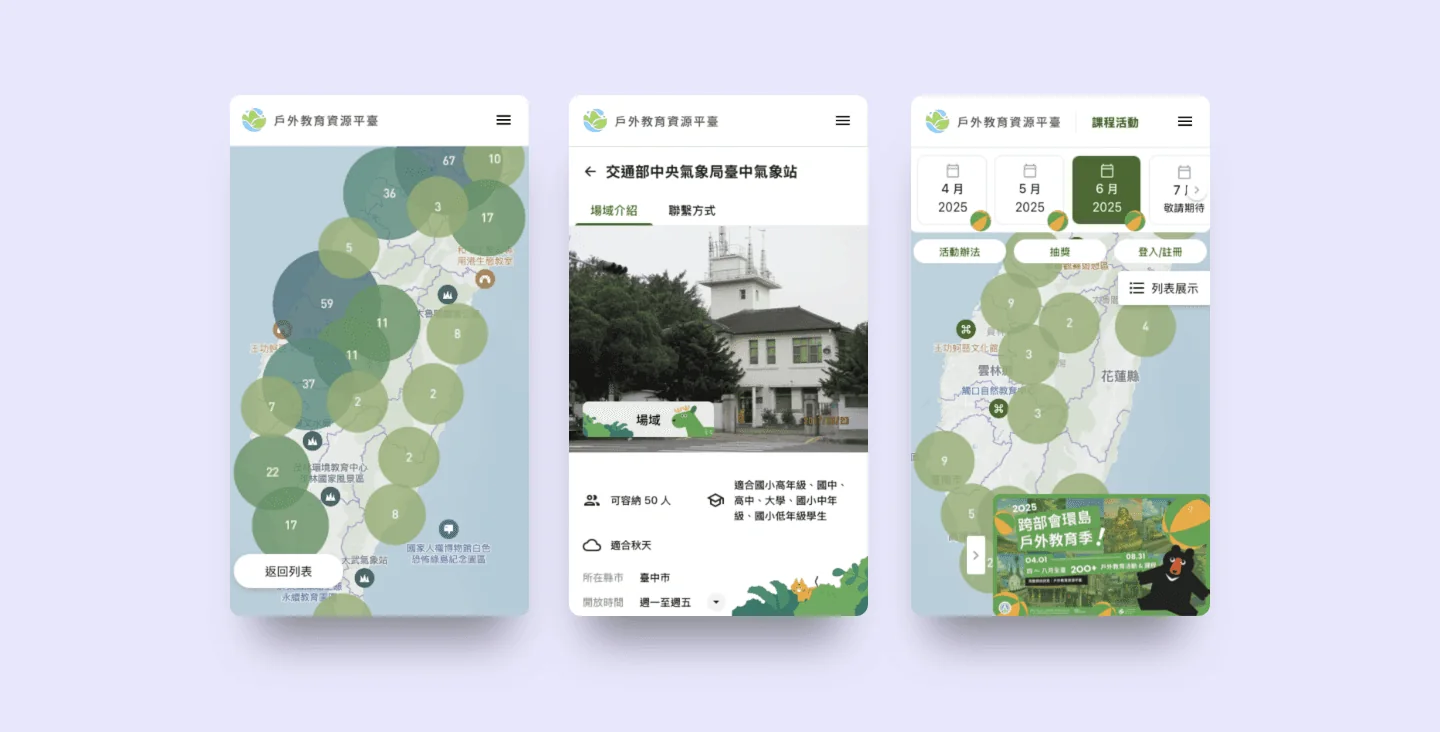
The platform on mobile: the map, a venue page and the monthly view.
Phone
On a phone, the list comes first and the map opens on demand
On a phone, venues are browsed as a list first. Choosing the map view opens a full-screen map where clusters, name labels and category icons update as it zooms, and the Back to list button at the lower left returns to the list at any time.
Phone screen recording: opening the full-screen map from the list, then zooming and dragging.
Phone recording: the map and list expand on demand.
Scanning lists possible problems; penetration testing shows how far an attack can goScanning lists possible problems; penetration testing shows how far an attack can go
Vulnerability scanning
Identify the systemsOperating systems, applications, open ports
Match against a known-vulnerability databaseOutdated versions, missing patches, misconfigurations
List the findingsHigh false-positive rate; a person has to review the results
Scan results
Penetration testing
Find likely targetsOften starts from vulnerability scan results
Chain multiple vulnerabilitiesSimulates a real attack
See how far it goesHow much access is gained, and whether defenders can detect it
Maintenance checks run on a schedule: two weekly, one monthlyMaintenance checks run on a schedule: two weekly, one monthly
Weekly runMonthly output
Month 1Month 2
Integrity
Weekly, compared with the prior week
Log digest
Weekly, covering the past week
System report
One per month
Only the three items with a documented cycle are drawn; the disk-usage alert fires on a threshold and the restore drill is described in the text, so neither is drawn. Position shows frequency only.
The third party scans and retests, the development team classifies and repairs, and the owner confirms in betweenThe third party scans and retests, the development team classifies and repairs, and the owner confirms in between
Report
Classification
Repair
Retest
Third party
System owner
Development team
1
Third partyScan and test, then issue the reportRun by a qualified third party
2
System ownerReceive the report and pass it to the development team
3
Development teamReproduce each finding and sort it as real or false positiveA reason written for each one
4
System ownerConfirm the classification and any dispute
5
System ownerConfirm this round's scope and what is deferred
6
Development teamFix by exploitabilityKeep before-and-after comparisons
7
Third partyRetest and judge whether each finding passes
8
Development teamExplain each fix and present the evidence
An illustration of roles; the actual division depends on each project's contract and the agency's requirements.
Read the full articleConfirm it is real first, then whether it can be exploited; each finding takes one of three pathsConfirm it is real first, then whether it can be exploited; each finding takes one of three paths
Reproduce the findingReplay the report's request in a test environment
Check it against the system's actual configurationWhether version, path, and existing mitigations match the report
Reproducible and exploitable directly from outside
Fix immediatelyKeep a request-and-response comparison from before and after the fix
Reproducible, but needs specific preconditions or is already mitigated
Schedule for the next roundRecord the preconditions and the basis for deferring
Not reproducible, or inconsistent with the system's actual configuration
File a false-positive disputeAttach the reproduction steps and configuration evidence
The envisioned feature list comes last, and an item-by-item check sets the scope Related methodThe envisioned feature list comes last, and an item-by-item check sets the scope
Read in order
Check item by item
Result
Client materials
Development team
1
Client materialsObligation documentsThird-party duties and audit clauses
2
Client materialsExisting systems
3
Client materialsEnvisioned feature listUsually 1.5–3x a reasonable scope
4
Development teamCheck item by itemRequired, or covered by quotation
5
Development teamMove out of scopeItems with neither
Read the full articleChecking security and operations: track record, retest records, then SLA Related methodChecking security and operations: track record, retest records, then SLA
Similar projectsScale and role played
Scan and retest recordsHow findings were fixed
SLA in the contract
All three check out
Compare quotes
No record to show
Ask for evidence
SLA terms are agreed per project and belong in the contract.
Nearly 10% of about seventy candidate findings were overturned before the report Related method, figures from another projectNearly 10% of about seventy candidate findings were overturned before the report
Candidate findingsabout seventyMerged from seven parallel scans, each finding verified against the code
Overturned in rebuttalnearly 10%Mostly patches that earlier developers left on purpose
Kept for the reportabout sixtySorted into red, yellow, and green
One full audit; figures are approximate
Read the full articleEvery finding gets a verdict: fix now, schedule the fix, or keep and record Related methodEvery finding gets a verdict: fix now, schedule the fix, or keep and record
Verify against the codeConfirm the problem exists
Try to overturn itCheck whether it is a patch left on purpose
It can hurt people, lose data, or invite attack
Fix nowRated red, with who should fix it and the estimated time
It carries risk but is not yet red
Schedule the fixRated yellow, placed in the maintenance plan after handover
It looks like a defect but proves to be a deliberate patch
Keep and recordWrite down why it must not be removed, so no one fixes it by mistake
Read the full articleThe first month sees the current state clearly and handles red findings first, without reworking old problems Related methodThe first month sees the current state clearly and handles red findings first, without reworking old problems
Before handover
Audit
Red findings
New code
Customer
Development team
1
CustomerPrepare materialsSource code or access to it, the current deployment method, problems from the last six months
2
Development teamScan, verify, rebutSeven areas scanned in parallel, each finding verified against the code, then deliberately challenged
3
CustomerRead the report and set the orderWho should fix it and the estimated time are written in each red entry
4
Development teamFix red findings firstEach fix comes with a check that fails if it breaks
5
Development teamNew code follows the rulesParameterized queries, ownership checks, signed callbacks
The Outdoor Education Resource Platform was fortunate to find the POLISH team to build its website. Throughout the process, they made good use of a range of software tools and guided us step by step through discussing and clarifying the problems. What was especially reassuring is that they went beyond surface issues. Through careful discussion and analysis, they effectively led us to the core problems, which is what made it possible to launch the platform we are so pleased with today.
LaiPlatform PO・NUTC
The first meeting takes 15 to 30 minutes and gives a direction, a budget range and a draft timeline.






 LaiPlatform PO・NUTC