



(Case study) Public sector · Education・Polish+

An annual cross-ministry outdoor education program, linking venues across Taiwan with a no-download web game

An outdoor education program held across Taiwan every year, launched by the Ministry of Education together with other ministries, covering more than 180 venues and more than 470 classes. The program runs as a no-download web game: players collect and answer quiz questions online, then complete a GPS check on site. The campaign period was 22 weeks. Planning, design, and development were completed in under two months.

Book the first meeting

An annual cross-ministry outdoor education program, linking venues across Taiwan with a no-download web game
< 2months from planning to finished build
10ministries
470+courses
22weeks of activity
Industry
Public sector · Education
Service
Polish+
Scale
10 ministries, 180+ venues, 470+ classes
Live
22-week campaign, no download required

(Challenge)

A program entry point that brings classes and venues across Taiwan together

This season's classes came from 10 ministries and more than 180 venues, on themes spanning natural ecology, the ocean, and Indigenous and other ethnic cultures. Opening hours and sign-up methods differ from class to class, so the program needed one entry point that brings the listings together and keeps participation going for 22 weeks.

For parents, it is a list that still needs research. For the organizer, a promotion budget may buy no more than a single page view. And the program had to hold attention for a full 22 weeks.

Desktop

Venues across Taiwan on one interactive map

Zoomed out, venues group into numbered clusters by region. Zoomed in, the clusters separate one by one, and hovering a venue shows its name and county. Monster icons mark each venue. The map stays open for browsing after the campaign ends.

Desktop screen recording: zooming from all of Taiwan to a single venue, with venue names on hover.

(Approach)

A web game as the entry point

The whole program runs in the browser with no app to download, and opening a link is enough to start. The first step draws a random exploration partner. A player can redraw, and the final pick becomes the avatar on the map. An invitation link shared with a friend opens straight onto the same page.

Choosing an exploration partner: the left button redraws, and characters change over in a misty light (recording from the live site, campaign-period version).

(Cross-agency)

How data from the ministries was combined

The Ministry of Education launches the program every year together with the Ministry of Culture, the National Park Service of the Ministry of the Interior, the Forestry and Nature Conservation Agency of the Ministry of Agriculture, the Ministry of Environment, the Ministry of Economic Affairs, the Hakka Affairs Council, the Tourism Administration of the Ministry of Transportation and Communications, the Ocean Affairs Council and the Council of Indigenous Peoples.

Survey forms from each unit were cleaned and merged by script into four data tables for venues, classes, monsters and quiz questions, with 187 venues, 476 classes and 1,056 questions in total. The map, the monster index, the quizzes and the exploration cards all use the same data.

How the campaign data was processed
  1. Survey forms from each unitVenues and classes supplied by each ministry
  2. Cleaned and merged by scriptFields and IDs unified
  3. Four data tablesVenues, classes, monsters, quiz questions
  4. Front end and assetsMap, monster index, quizzes, exploration cards

(Key design)

Three key designs

Three-stage evolution

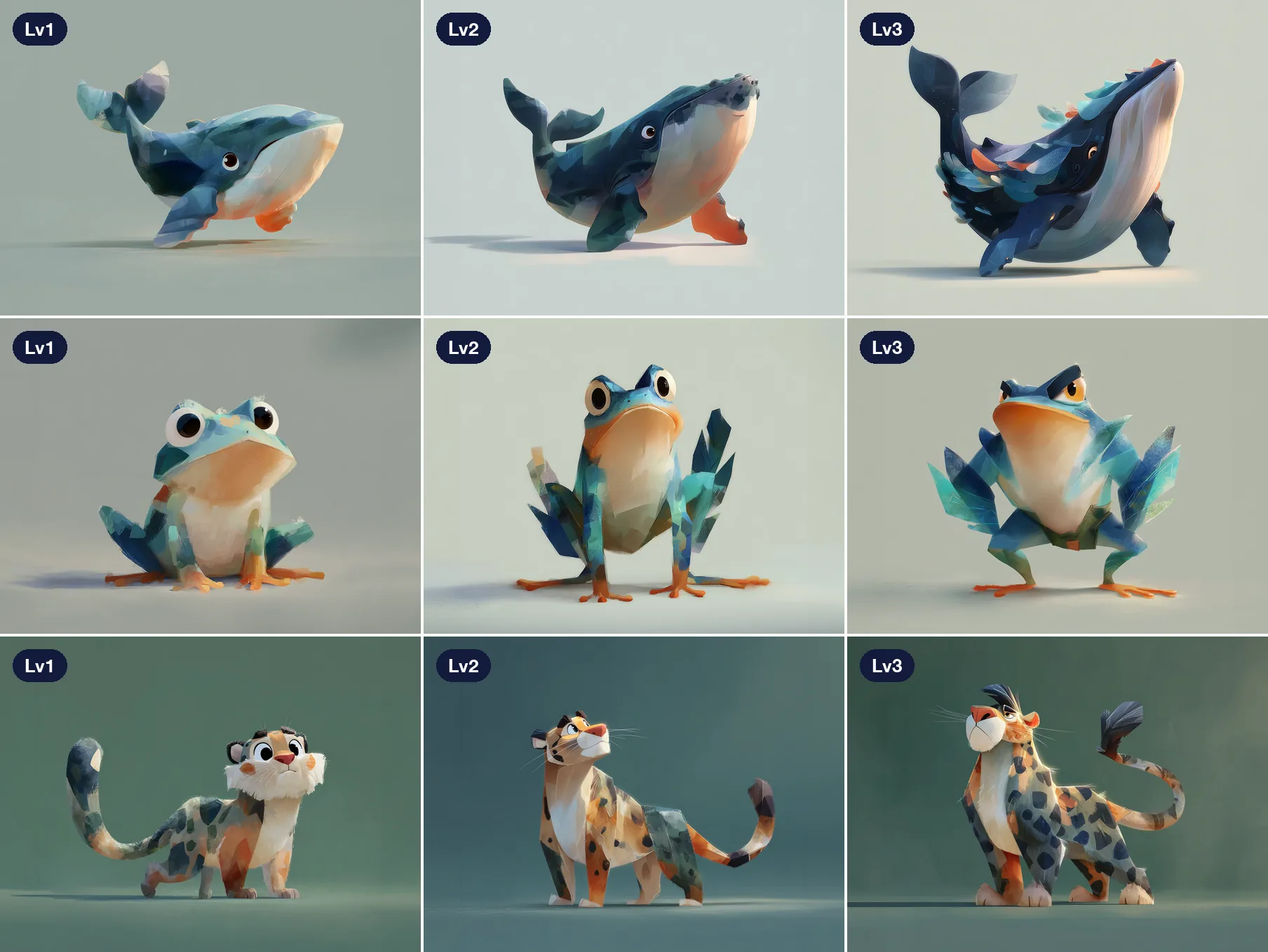
Each class has one monster that evolves in three stages. Lv1 is collected by pressing Collect on the map, which also unlocks the class content. Lv2 requires answering a knowledge challenge tied to the class. Lv3 requires four tasks, one of which is a GPS check within 500 meters of the venue, followed by a written tip.

Real capture during the campaign: open a venue on the map to collect Lv1, then answer the question to evolve to Lv2.
One monster per class: Lv1 and Lv2 are completed online, and Lv3 requires a check at the venue
  1. Lv1 CollectPress collect on the map, and the lesson content unlocks at the same time
  2. Lv2 Knowledge challengeAnswer one question about the lesson
  3. Lv3 Four tasksIncluding GPS verification within 500 m of the venue and a tips write-up
On a real phone: collecting a monster and viewing its exploration card.

On-site verification

The rules were designed with public-sector needs in mind. GPS is read once, only when the player taps to authorize and verify, with no background tracking, and the server counts a visit only when the player is within 500 meters of the venue. The server calculates a cooldown from the travel distance between two verifications, up to 60 minutes, to prevent abnormal scoring.

Arrival verification reads the position once, and only the server's decision awards points
  1. Player grants permissionReads the position once, with no tracking in the background
  2. Server calculates the distance
  • Within 500 m of the venue
    Points awarded
  • Beyond 500 m
    No points
  • Too soon since the last verification
    CooldownBased on distance moved, up to 60 minutes

Draws and leaderboards

Every 100 energy points convert automatically into one raffle ticket, with a draw at 8 p.m. each Friday and a bonus draw each month. Two leaderboards, for power and for energy, run through the season.
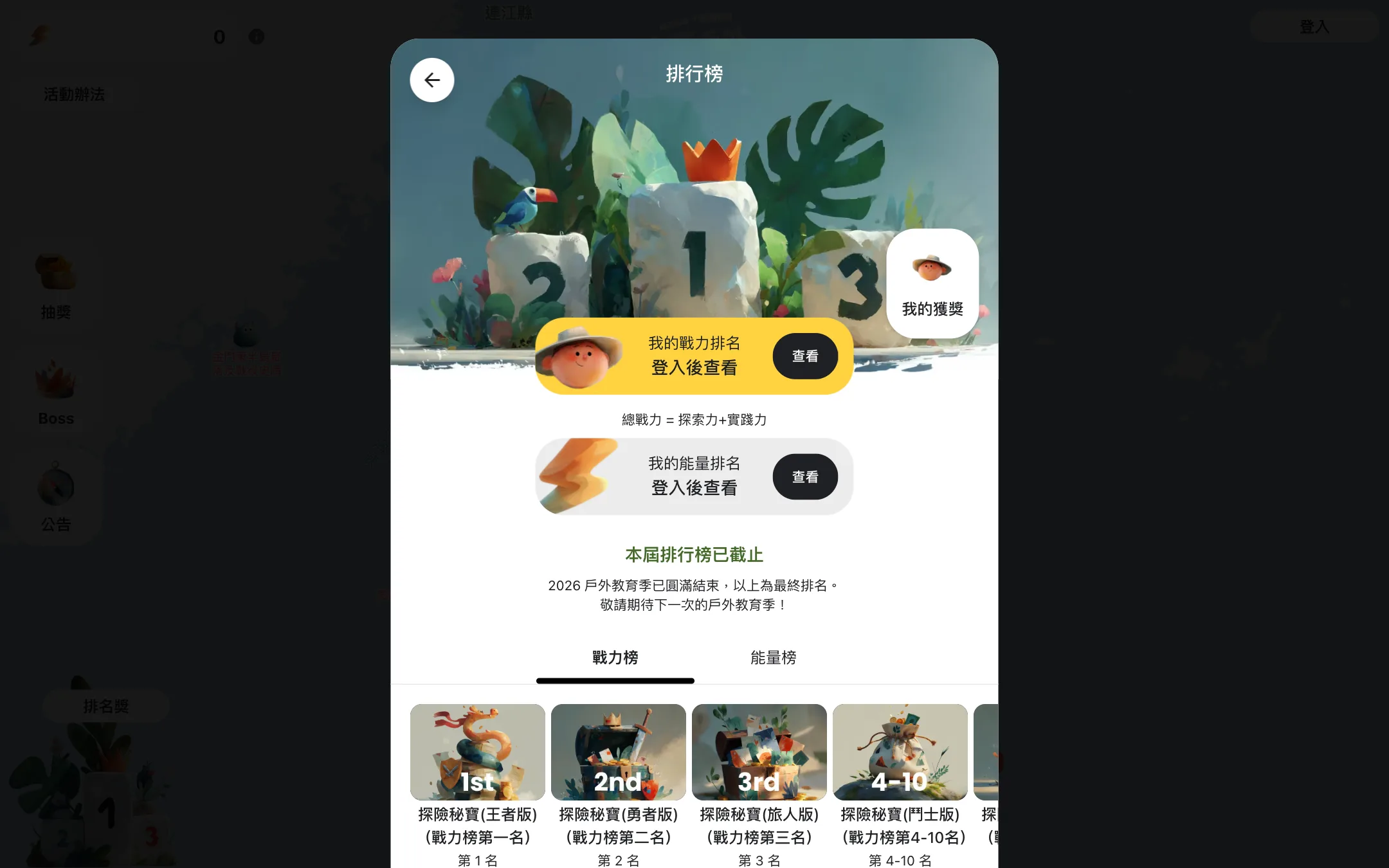
Final rankings on the post-campaign page: rank ranges and prizes.

For multi-agency campaigns that must hold interest for weeks, the first meeting can settle the mechanics and rules.

(Characters)

Character generation and exploration card output

The monster characters are generated with AI. Each prompt combines the evolution stage, the species traits, a fixed art style and a regional background color, and is stored in the same data table as the class data. In all, 480 species and 1,440 images were published.

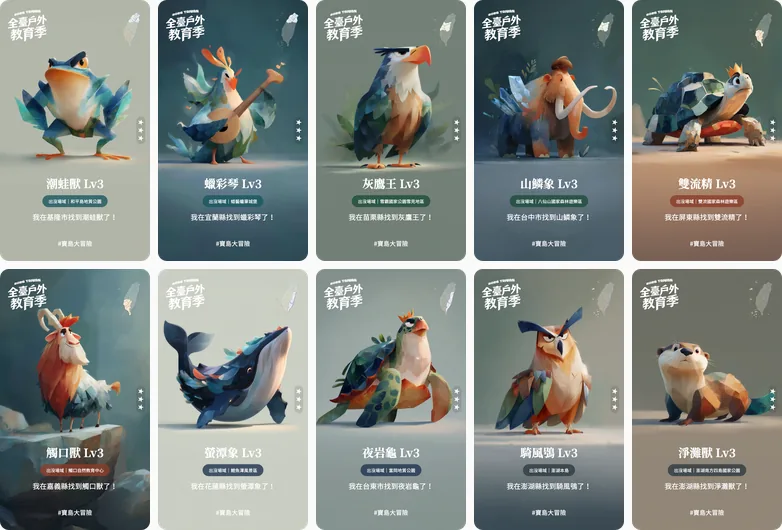
Exploration cards follow the size of the design file. A script fills the template and exports image files at double resolution. The images are then converted into five sizes by use, with map thumbnails of about 2 KB and class images of about 21 KB.
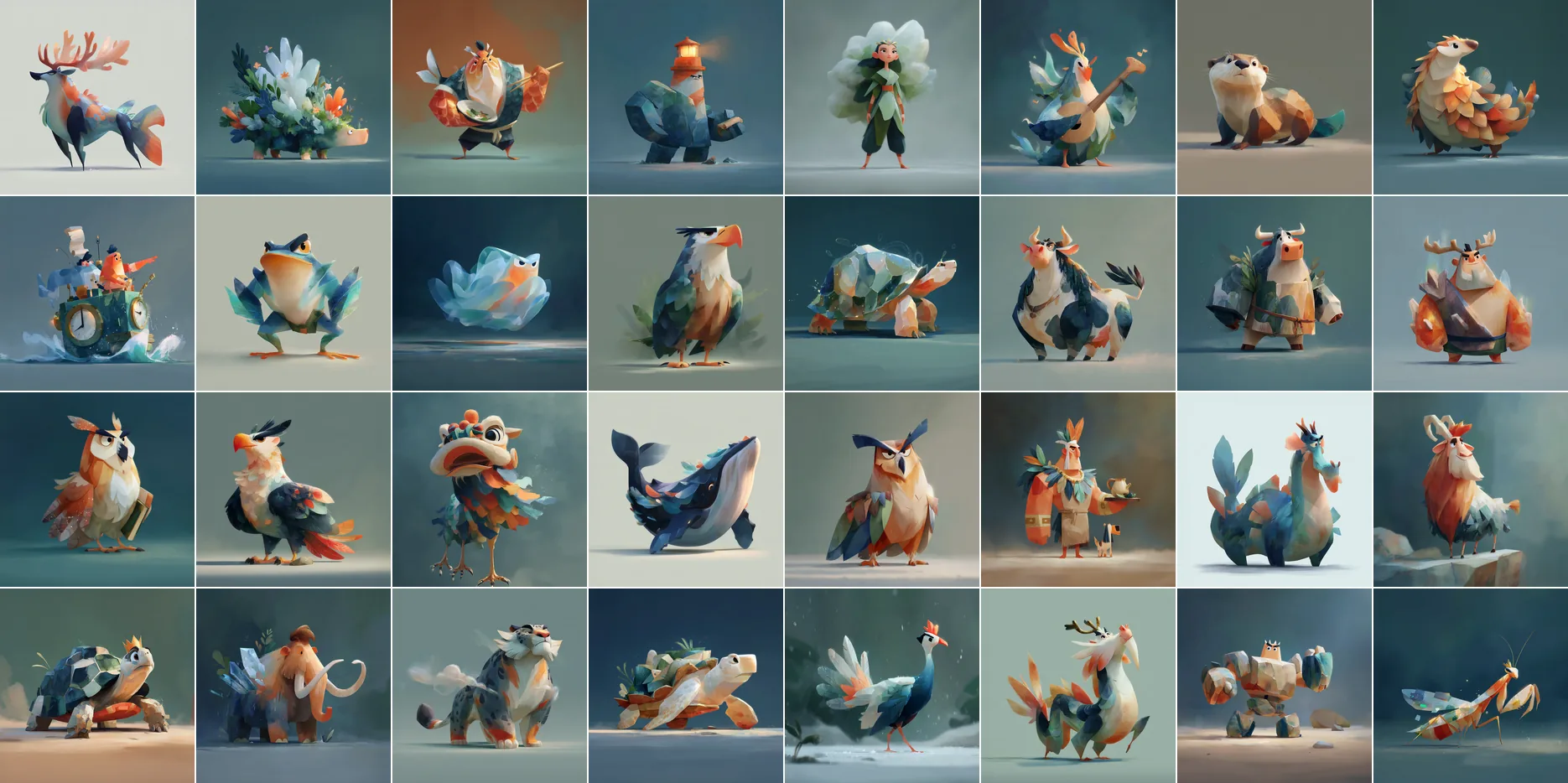
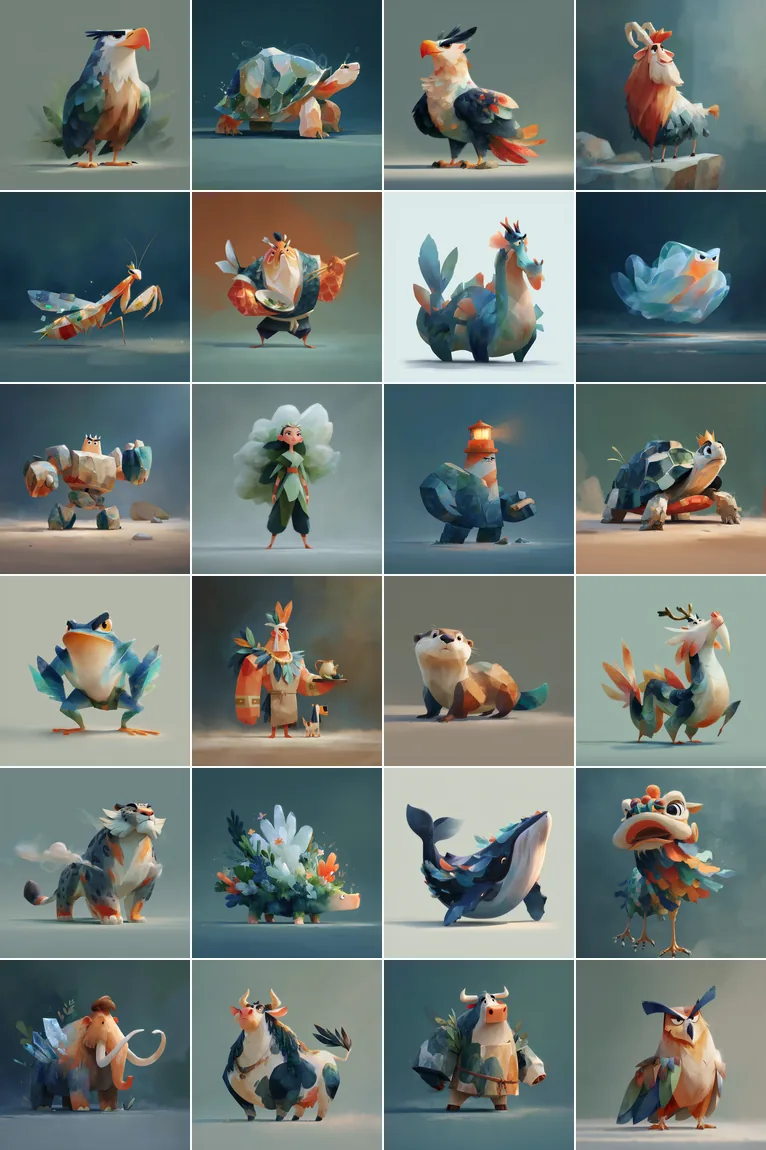
The original artwork of the published characters.The original artwork of the published characters.
The original artwork of the published characters.
The three evolution stages of each of three monster species.
Exploration cards are color-coded by region and exported in batches by code.Exploration cards are color-coded by region and exported in batches by code.
Exploration cards are color-coded by region and exported in batches by code.

(Result)

The campaign closed on time, with rankings and records kept in full

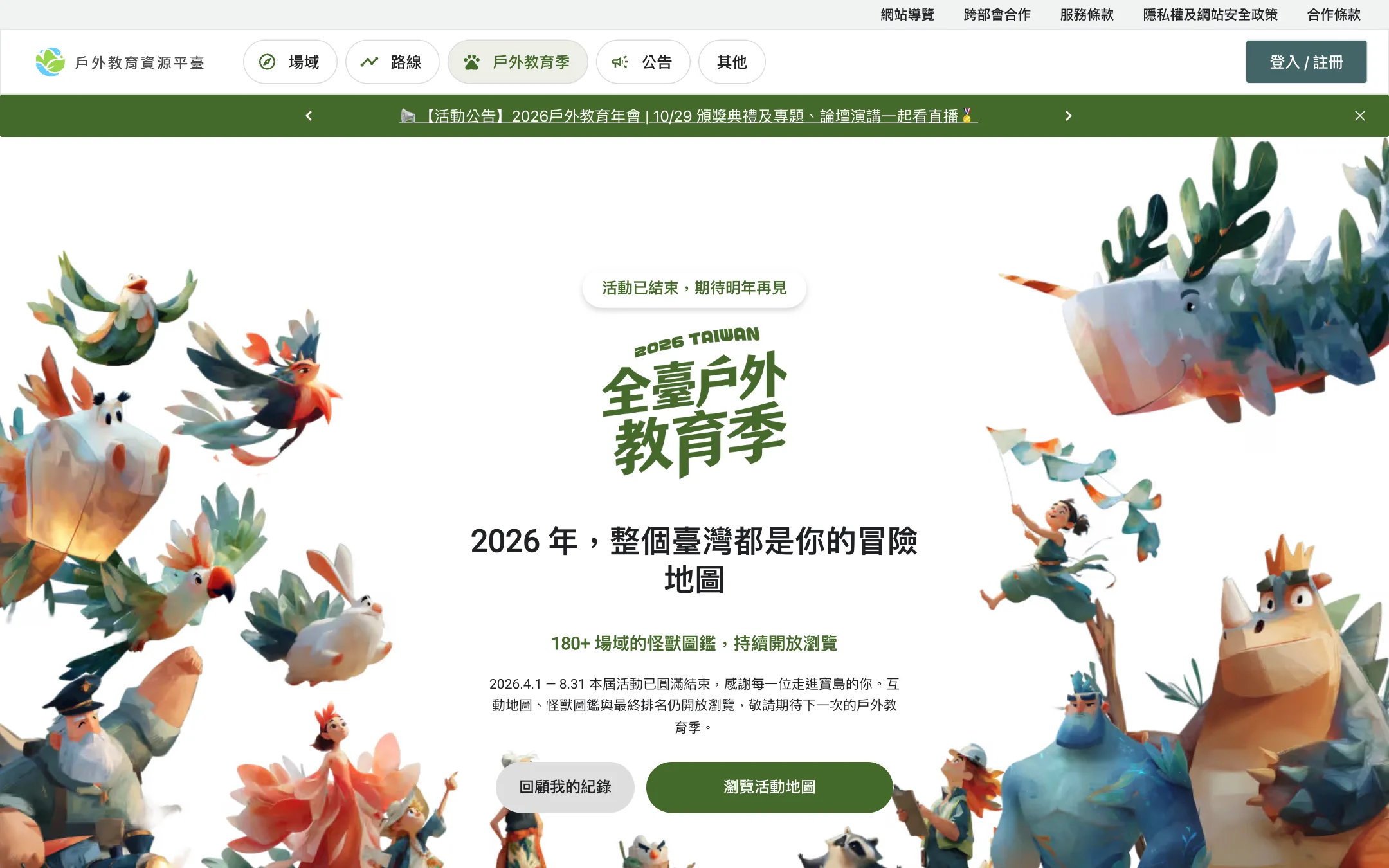
The competent authority received a complete event website: home page, partner selection, interactive map, monster index, tasks, raffle and leaderboards. Once 11:59 p.m. on August 31 passed, the screens switched to an event-ended version and the server blocked every scoring action, while login, map browsing and personal records kept working. Final rankings froze on September 1, and the leaderboards can be viewed without logging in.

This mechanism also suits yearly promotions across agencies and venues, and long-running campaigns for venues, parks and brands.
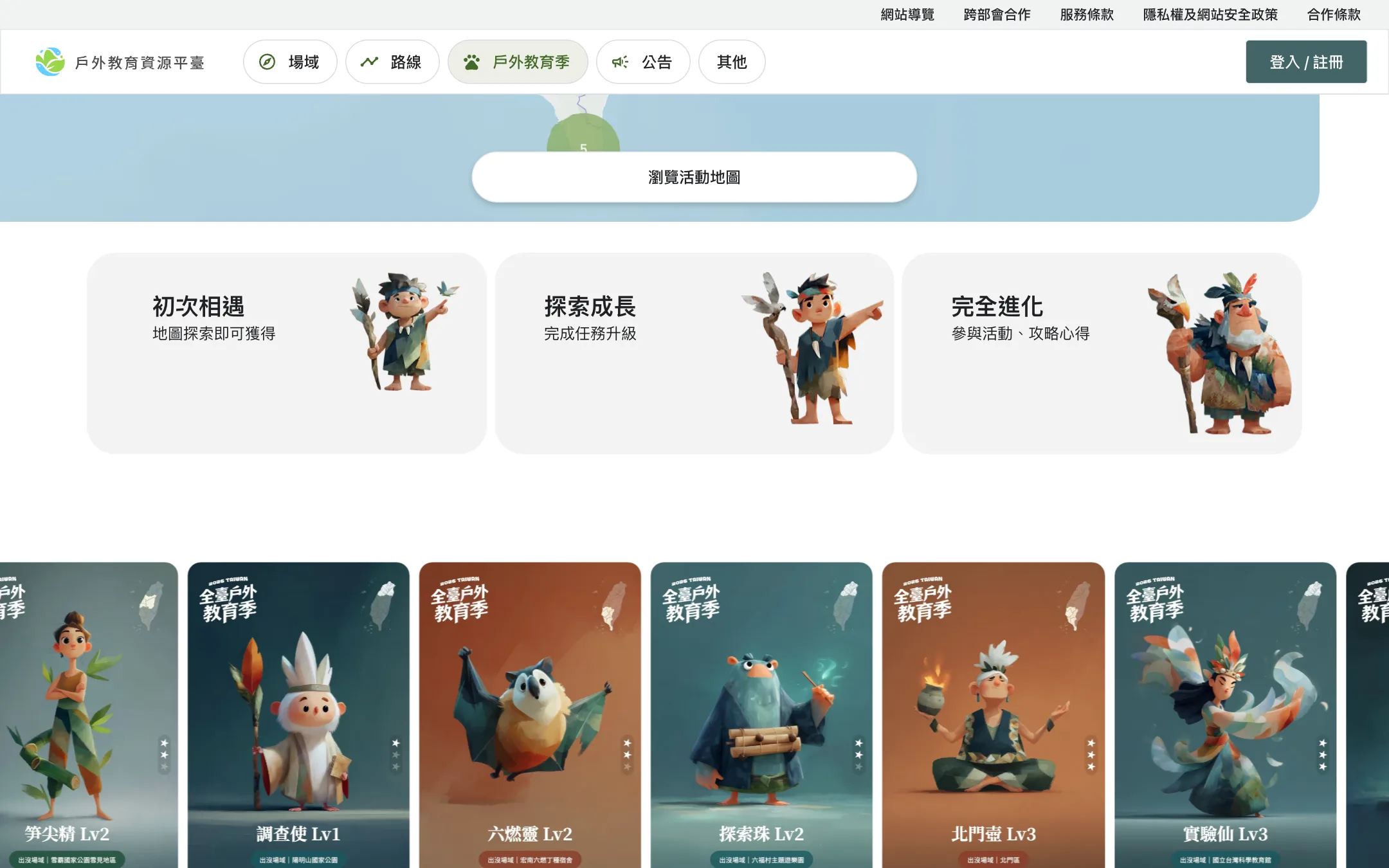
Event home page: three steps, the island-wide interactive map, three-stage evolution and class monster cards. Scrolling down is enough to learn how to play (recording from the live site, campaign-period version).
The monster collection list.
The home page after the campaign ended.

Phone

Opens in the phone browser, no download

The same map is fully usable on a phone: clusters, monster icons and name labels update live as the map zooms and pans.

Phone screen recording: zooming and panning the interactive map.

When the campaign ends, screens switch automatically and scoring stops on time.

Each state is switched by the front-end screen, the admin switch, and the operator action together
Warm-up
Open
Closed
Archived
Front end
Admin and settings
Operations
1
Front endCountdown pageThe home page can still be shared and found in search; every other page returns 503
2
Admin and settingsSet the launch timeControlled by a runtime variable; pages open only at that time
3
OperationsCheck prizes and budgetThe prize table opens only after it passes budget validation
4
Front endCampaign pages and leaderboardRewards always post through the shared ledger code
5
Admin and settingsAdjust admin parametersEvery threshold has guardrails; changes leave an audit trail
6
OperationsWatch the dashboard, run reviewsHandle accounts pending review and rewards pending credit
7
Front endResults page and leaderboardStill viewable; raffles and similar features are closed
8
Admin and settingsClose features that move moneyValidate the budget once more before settlement
9
OperationsSettle and claw backPending rewards can be clawed back within the window
10
Admin and settingsStop campaign and leaderboard calculation
11
OperationsKeep the ledger entriesFor later reconciliation

States: warm-up, open, closed, archived

Read the full article Reward Campaign Platforms: Ledger Integrity, Abuse Prevention, and Budget Controls

(Field notes)

Methods and measurements, open each one

Reward Campaign Platforms: Ledger Integrity, Abuse Prevention, and Budget Controls

Reward services post only through the shared ledger code and never write the points table directly Related method
Reward services post only through the shared ledger code and never write the points table directly

Reward services

  • Redemption and rafflesCall the ledger code, never touch the points table
  • Ranking settlement and payoutsRun on a schedule; each entry carries a key built from the event
Reward request and unique keyResult: posted, duplicate, or rejected

Shared ledger code

  • Unique key checkA repeated key is answered as already processed and pays nothing
  • Member lock and lock orderLock the member first; two-member transactions lock by ID, lowest first
  • One adjustment functionEvery credit and debit passes through this single place
Writes inside one transactionCurrent balance

Database

  • Member rowsLocked inside the transaction
  • Ledger entriesEach entry carries a duplicate-prevention key

Stays inside the boundaryWrite access to the points table belongs to the shared ledger code only. Reward services cannot write to it directly, and the check script scans for code that tries.

Scope: points, coupons, and ranking prizes that carry cash cost

Read the full article
Every reward request ends in one of three outcomes: posted, pending, or rejected Related method
Every reward request ends in one of three outcomes: posted, pending, or rejected
  1. Check the unique keyA key already processed is answered as a duplicate and pays nothing
  2. Lock the memberRequests from the same member queue
  3. Apply the rulesTransfer cap, device grouping, budget, and balance
  • Rules pass and the reward is not high-value
    Post immediatelyWritten to the ledger
  • The reward is high-value, or the account sits in an anomalous group
    Record as pendingCredited after a delay, or sent to an operator for review; the admin can claw it back meanwhile
  • A cap is exceeded, the key is a duplicate, or the balance is short
    RejectThe reason is returned and nothing is posted
Read the full article

(Client note)

From the initial concept to the final launch, the team stayed meticulous and patient, accurately grasped the core of our brand, and turned it into an engaging website. The whole process was efficient and smooth. The visuals were striking, and user interaction rose significantly.

LaiPlatform PO・NUTC

The first meeting takes 15 to 30 minutes and gives a direction, a budget range and a draft timeline.

Polish+Next case: From an in-person event of about 60 students to an online expo with more than 12,000 student logins

(Contact)

Start a project.

Three steps to a clear direction and budget range.

  1. 01Book the first meeting: choose a time. A full specification is not required.
  2. 02A 15 to 30 minute online consultation: direction, budget range, and draft timeline.
  3. 03After materials are reviewed, a quote and delivery specification follows in about 3 to 5 working days.
Email
hello@polish-design.com.tw
Mailing address
3F, No. 191-1, Zhifu Rd., Zhongshan Dist., Taipei 104, Taiwan

Book the first meeting

Monday to Friday, 16:00–18:0030 minutes online

Choose a time, then confirm with a Google account or an email address. A confirmed booking can be added to the calendar.

Choose a time

Or send the details first

Not ready to pick a time yet: leave the project details here and the team replies by email. A meeting can still be booked right after sending.

More details (optional): service, stage, links, source

Information is used only to evaluate this project.

ISO/IEC 27001:2022 certificate

(Certificate)

ISO/IEC 27001:2022

Certification body
ARES International Certification
Scope
The development process for interactive immersive 3D systems, and network and infrastructure operations and management.

Verify with ARES